Installation
Web Terminal
Mode 2 inside the logged-in dashboard — same hosted MCP as local mcpcli, answer-card output, public GitHub repos only. No npm install required in the browser.
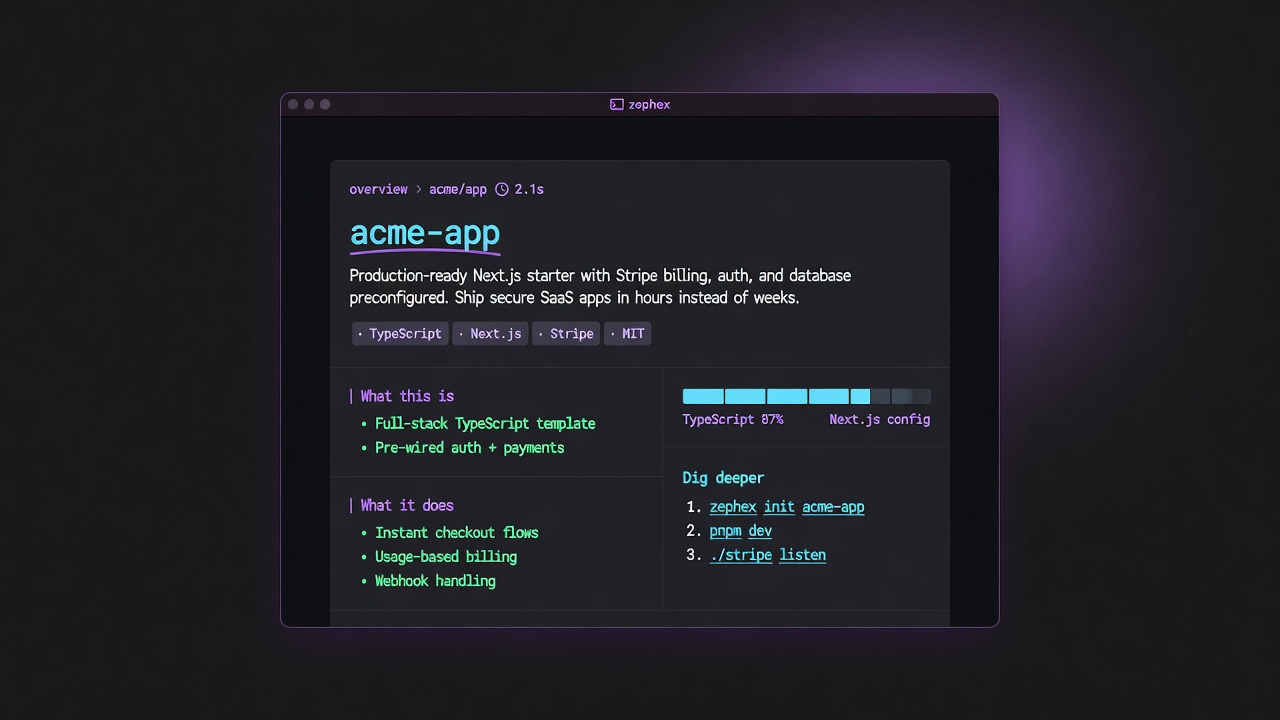
Web terminal reuses Mode 2 answer-card language: hero, tags, Dig deeper.
Open /dashboard/terminal after signing in. Need a key: API keys. Full argv list: Terminal tools complete guide · What each command does · Local Mode 2 · install (download public GitHub / npm files).
- You paste a public GitHub URL — the server materializes the repo for analysis.
- Commands hit the same hosted tools as local CLI (find_code, get_project_context, …).
- Output is human-first (cards / briefs), not a raw agent dump.
- Local projects with private code: use
npm install -g zephexandmcpclion your machine instead.
| Command | Purpose |
|---|---|
overview | Product story + stack bars |
get-context | Structured project brief |
find-code | Search symbols / strings |
summarize | Plain-English file read |
check-test | Run tests + failures |
safe | Package safety before install |
architecture | How modules wire |
check url | Live URL security audit |
remember | Save a project fact |
| MCP | Type in terminal |
|---|---|
get_project_context | get-context · overview |
find_code | find-code · find · rename |
read_code | summarize · outline · symbol |
explain_architecture | architecture · arch |
check_test | check-test · test (legacy: scope-task) |
check_package | check-package · safe · pkg |
project_memory | remember · recall · memory |
audit_headers | check url · site-audit |
keep_thinking | think · reason (one-shot) |
Zephex_dev_info | docs · ask |
- Sign in at zephex.dev
- Create or confirm an API key
- Paste a public GitHub URL, e.g.
https://github.com/vercel/next.js, then click Apply - Run
overviewfirst (recommended — one billed command, seven internal context calls) - Run other commands in the terminal pane
Slash commands
In the web terminal (and local zephex shell), type / to open the palette. Each row fills the command line — press Enter to run. MCP-backed slashes need sign-in and an API key; /help and /clear are local. Also try on zephex.dev/cli (browse without login; tools blocked until you sign in).
| Slash | Runs | MCP tool | When to use |
|---|---|---|---|
| /overview ★ | overview | — | Best first command — story, stack, run; also: overview https://github.com/owner/repo |
| /context | get-context | get_project_context | get_project_context — one-call brief; also: context https://github.com/owner/repo |
| /architecture ★ | architecture | explain_architecture | explain_architecture — wiring map; also: architecture github:owner/repo --focus auth |
| /find ★ | find auth | find_code | find_code — ripgrep; find auth https://github.com/owner/repo (URL is the repo, not the query) |
| /read ★ | read src/index.ts | read_code | read_code — plain-English file brief; filter /symbol /who /files /scan |
| /package | check-package express | check_package | check_package — one pkg deep-dive; filter /safe /deps /upgrade /migrate |
| /web ★ | web example.com | — | Live site intel — stack, headers, secrets; filter /site /check-url /shadow |
| /supply ★ | supply https://example.com | — | Wide security scan — filter /supply-site /supply-audit /secrets |
| /usage | usage | — | Tools, key names, credits |
| /keys | keys | — | Installed keys & quota |
| /sessions | sessions | — | List terminal tabs |
| /help | help | — | All /commands + 10 MCP tools — same tools in Cursor via npx zephex setup |
| /connect | connect | — | npx zephex setup for Cursor / VS Code |
| /clear | clear | — | Clear the terminal |
Local REPL shows 37 commands on bare / (test, failures, memory, doctor, …). Browser embed shows the 14 rows above. Full palette: Slash commands. Filter with /defs, /check-url, /auth, and 100+ more filter entries.
Commands are allowlisted in web-terminal-allowlist.ts. Shell operators (|, &&, ;) and raw shell (rm -rf, curl) are blocked. Unknown commands return: Try: overview · find · help.
overviewstatsget-contextframeworkdatabasebackendfrontendfind authcount keyboardrename MySymbolpaste "/export default"defs handleAuthread-code package.jsonsummarize src/index.tsarchitecture --focus authcheck-test "rate limit API"check-package expresssafe lodashcheck url https://zephex.devsite-audit https://zephex.devaudit-headers https://zephex.devsupply .sup chainshadow .helpclearcompasslearndocs "mcp setup"ask "how do I connect cursor"Not available in web terminal
Account / install / local-only flows stay on the npm CLI: setup, login, logout, doctor, repair, init, and scanning localhost. Use npm install -g zephex then mcpcli on your machine for those. Package upgrade alias loop-guard is the same as check-package --task upgrade — prefer the primary name when available.
Yes in web terminal: check url / site-audit, check-test, remember/recall when path allows, overview, find/read/architecture, packages, supply/shadow on public targets.
Public GitHub repos only
The web terminal clones public GitHub repositories on the server. Private repos, GitLab, and Bitbucket are not supported. If a repo is private or missing, you will see:
Private repos are not supported. Paste any public GitHub URL to get started.- Each routed command (except meta commands below) counts as one monthly request — including
overview, which runs multiple internal MCP calls but bills once. help,clear,compass, andlearndo not count against your monthly quota.- Tier limits match usage limits: Free 555/mo, Pro 3,500/mo, Max 10,000/mo.
check url(andsite-audit/audit-headers) stream progressive output — audits can take 30–120 seconds- Click a command chip to fill; Shift+click to run immediately
- Paste a code line without a command prefix (e.g.
export default function App()) — it routes topaste - Prefer the npm CLI for local projects — see Terminal tools (Mode 2)
Terminal tools complete guide · Full CLI reference · API keys · Usage limits