Configuration
How Zephex Works
One account, one hosted endpoint (https://zephex.dev/mcp), 10 tools. Mode 1 is your editor agent (lean JSON). Mode 2 is you in the terminal (plain-English answer cards). Same API key for both.
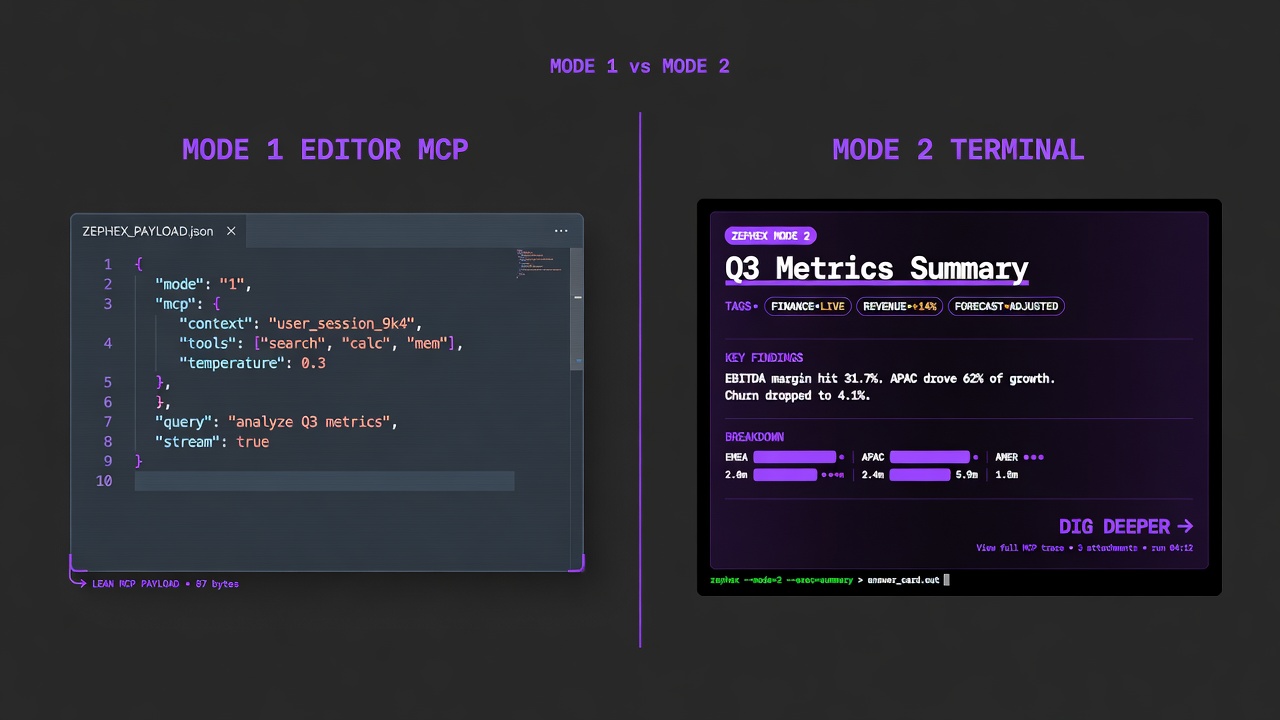
Mode 1 feeds the agent. Mode 2 feeds you — hero, tags, │ sections, Dig deeper.
MODE 1
Mode 1 — Editor MCP
Who: Cursor, Claude Code, VS Code, 22+ editors
Transport: stdio or HTTPS to zephex.dev/mcp
Output: Lean JSON for the agentmcpcli setup --cursor
MODE 2
Mode 2 — Terminal CLI
Who: You in bash / PowerShell / Docker
Transport: Same API key · hosted tools · local inline_files
Output: Answer cards — plain English, Dig deepermcpcli init
Every editor tool call is JSON-RPC 2.0. The CLI may run as a local stdio bridge, or the editor may call HTTPS directly. Either way the hosted proxy authenticates the Bearer key, enforces quotas, and runs the tool.
Your editor sends a single JSON-RPC call. The proxy authenticates, routes to the right tool, returns one response.
Editor agent decides it needs context → tools/call get_project_context { path | inline_files } → https://zephex.dev/mcp (Bearer API key) → Auth · rate limit · tool router → Structured JSON result → Agent uses fields (stack, scripts, env names) in its replyYou type a short command. Intent routing maps typos and plain English to a tool — no LLM for routing. The CLI builds a local index from disk, calls the same hosted tools, then renders an answer card (not a chat monologue).
No AI agent in the loop. Your shell runs npx zephex; the CLI uploads a search index from disk (inline_files) and calls the same hosted endpoint as your editor.
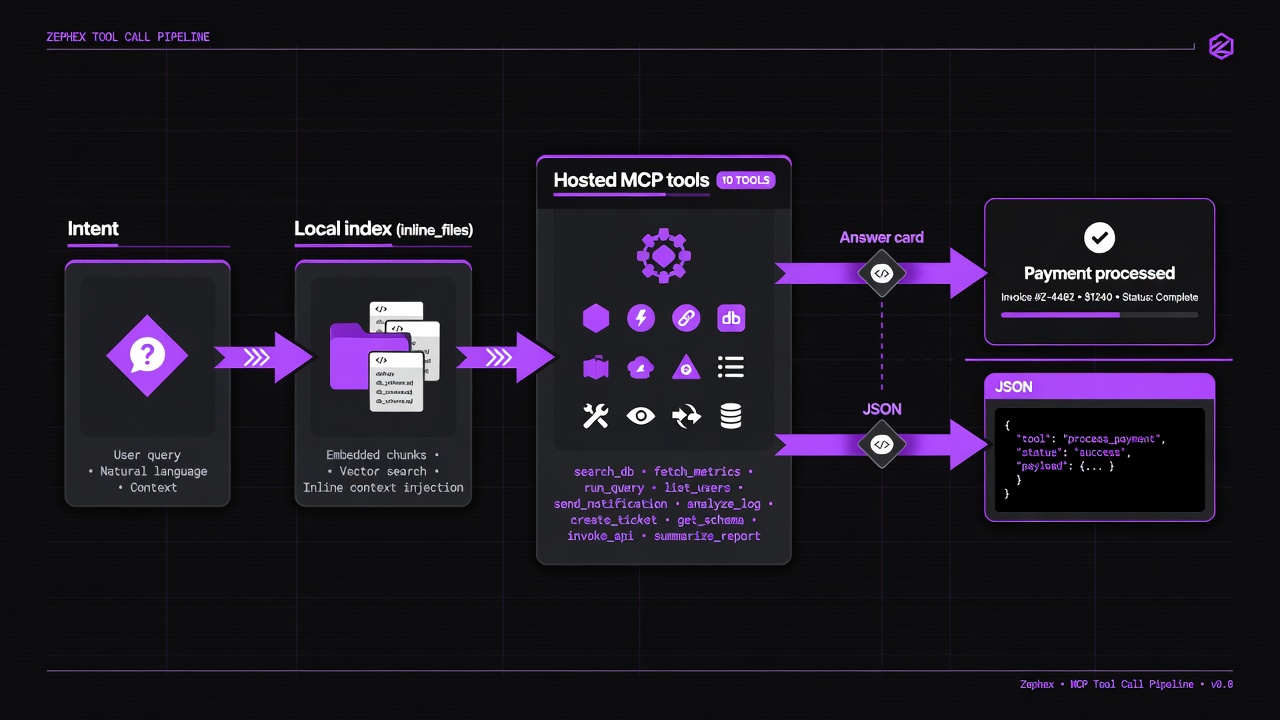
Intent → local index → hosted tools → answer card (or --json).
npm install -g zephexmcpcli initcd your-appmcpcli overviewmcpcli find-code "auth"mcpcli safe expressmcpcli check-testmcpcli check url https://example.commcpcli doctorKeys look like mcp_prod_word-number.secret (or mcp_dev_…). The server stores a hash — never the full secret in logs. Terminal keys live in ~/.zephex/credentials.json(mode 600). Editor keys live in each editor's MCP config.
Default (terminal + many tools): upload manifests + bounded source as inline_files from your current directory.Private repos work without making GitHub public.Force remote only with --path github:owner/repo or --no-local.Empty ~ or /tmp fails fast — do not burn quota.Monorepos: cd into the package or pass --cwd.Keys are hashed. Usage metadata is logged. Tool payloads are request-scoped. Terminal credentials stay on your machine.
Bare words can mean more than one feature. Dispatch order in the CLI is product policy — not a bug. Prefer explicit flags when you need the other meaning.
| You type | CLI runs | If you wanted something else |
|---|---|---|
structure | structure (file map — free GitHub tree / local inventory) | mcpcli architecture for wiring · mcpcli overview for product story |
env | env-check (local env gaps) | mcpcli get-context --topic env |
upgrade (no args) | CLI self-update | mcpcli upgrade next or mcpcli check-package next --task upgrade |
test / check-test | check_test (Test Pulse) | Package named test → check-package test |
check url … | audit_headers | — |
secrets | supply --only secrets | — |
remember / recall | project_memory | Not package upgrade (loop-guard) |
loop-guard / audit | check-package --task upgrade | Prefer check-package --task upgrade |
Full maintainer table: /docs/cli-dispatch-policy.md (also in the monorepo under docs/cli-dispatch-policy.md).
| Tier | Requests / month | Price |
|---|---|---|
| Free | 555 | $0/mo |
| Pro | 3,500 | $7/mo |
| Max | 10,000 | $19/mo |
| Error | Meaning |
|---|---|
-32002 / HTTP 429 | Burst / rate limit — respect Retry-After |
-32003 | Monthly quota or per-key cap exceeded |
-32001 | Auth failure (invalid/expired key) |
- Same account quota applies to editor MCP and terminal CLI.
- overview may run multiple internal analyses but bills as documented for that product path.
- help / learn / compass (local) do not burn hosted credits.
Response headers often include: X-RateLimit-Limit · X-RateLimit-Remaining · X-RateLimit-Reset · Retry-After (on 429).
- HTTPS only to zephex.dev — TLS for all client traffic.
- API keys hashed at rest; never log full secrets in production paths.
- Rate limits per key via Upstash-style sliding windows; 429 + Retry-After.
- Dashboard uses secure cookie flags on session auth; MCP uses Bearer keys.
- Tool allowlisting on the server — arbitrary tool names from clients are rejected.
- Local CLI credentials: ~/.zephex/credentials.json with restrictive file mode.
Common mistake: running from ~ or /tmp. Zephex fails fast so you do not burn quota on empty folders. cd into an app with package.json / source first.
Every MCP tool has a terminal command. Only multi-turn keep_thinking sessions are editor-only nuance — not audit_headers or project_memory.
| MCP tool | Terminal | Example |
|---|---|---|
get_project_context | get-context · overview | mcpcli overview |
find_code | find-code · find · rename | mcpcli find-code "auth" |
read_code | summarize · outline · symbol | mcpcli summarize src/auth.ts |
explain_architecture | architecture · arch | mcpcli architecture --focus auth |
check_test | check-test · test (legacy: scope-task) | mcpcli check-test |
check_package | check-package · safe · pkg | mcpcli safe express |
project_memory | remember · recall · memory | mcpcli remember "auth uses JWT cookies" |
audit_headers | check url · site-audit | mcpcli check url https://zephex.dev |
keep_thinking | think · reason (one-shot) | mcpcli think "debug 401 loop" |
Zephex_dev_info | docs · ask | mcpcli docs "Stripe webhooks" |
- keep_thinking multi-turn: Terminal think/reason/debug-think is one-shot. Full sessionId checkpoint loops are editor MCP after setup.
Terminal replies are designed like a senior engineer sitting next to you: hero name, 2–4 sentences of plain English, · tags, │ section rails, language bars when useful, numbered Dig deeper. Empty sections are dropped — no invented stacks. Use --json for agent parity.
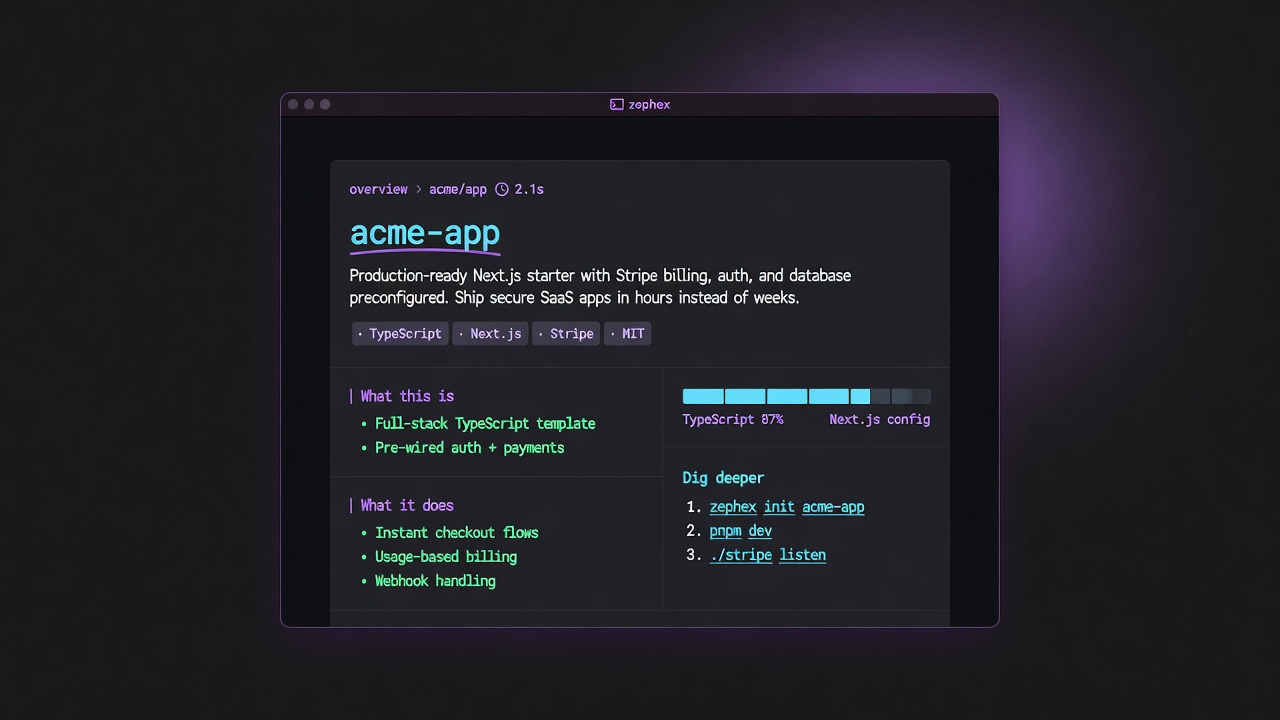
Hero · plain English · tags · rails · Dig deeper.
| Command | What you get |
|---|---|
overview | Product story + stack bars |
get-context | Structured project brief |
find-code | Search symbols / strings |
summarize | Plain-English file read |
check-test | Run tests + failures |
safe | Package safety before install |
architecture | How modules wire |
check url | Live URL security audit |
remember | Save a project fact |
connect | Wire an editor MCP |
mcpcli overviewmcpcli find-code "validateToken"mcpcli check url https://staging.example.commcpcli remember "rate limit is Upstash per API key"