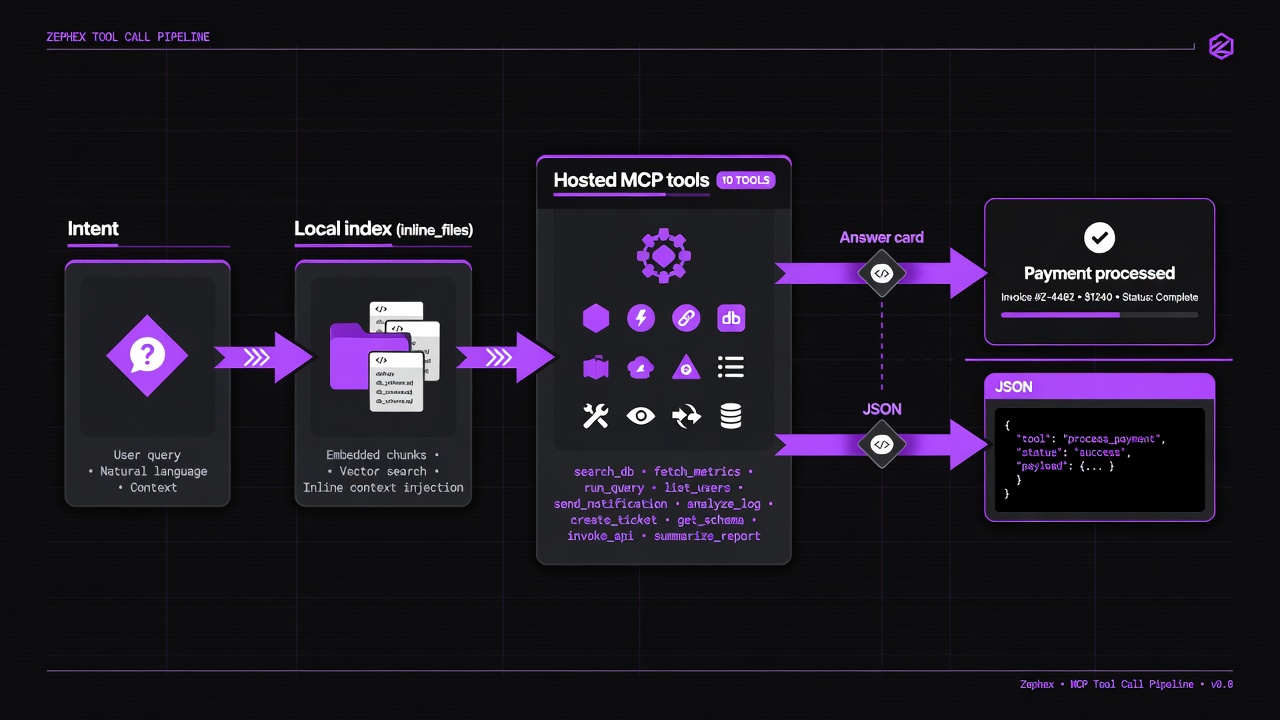
Chain tools: orient → search → read → verify. Terminal prints answer cards; agents get JSON.
START-HERE COMMANDS (TERMINAL)
| Command | Purpose |
|---|
overview | Product story + stack bars |
get-context | Structured project brief |
find-code | Search symbols / strings |
summarize | Plain-English file read |
check-test | Run tests + failures |
safe | Package safety before install |
architecture | How modules wire |
check url | Live URL security audit |
remember | Save a project fact |
connect | Wire an editor MCP |
DEEP RECIPES — AGENT + MCPCLI
Every recipe lists the MCP tool, what to ask an agent, the terminal command, and what you should see.
~4–6 successful tool calls
Onboard a new clone in 10 minutes
Scenario: You just cloned a repo and need the product story, stack, and where auth lives.
| # | Tool | Agent | Terminal | You get |
|---|
| 1 | overview / get_project_context | get_project_context (topic identity then run) | mcpcli overview | Answer card: what it is, stack tags, how to run |
| 2 | get_project_context | get_project_context topic=auth | mcpcli get-context --topic auth | Auth provider + env names (no secret values) |
| 3 | explain_architecture | explain_architecture focus=auth | mcpcli architecture --focus auth | Wiring map: entry → middleware → session |
| 4 | find_code | find_code intent=symbol query="auth" | mcpcli find-code "auth" | Ranked paths to open next |
Why this order: Overview orients; topic zooms; architecture shows flow; find lands on symbols.
cd my-appmcpcli overviewmcpcli get-context --topic authmcpcli architecture --focus authmcpcli find-code "auth"
1–3 package calls (no project required)
Before you npm install anything
Scenario: A tutorial or AI suggested a package you have never used.
| # | Tool | Agent | Terminal | You get |
|---|
| 1 | check_package | check_package task=check | mcpcli safe express | Exists? CVEs? postinstall risk? typosquat? |
| 2 | check_package | check_package task=security version=… | mcpcli check-package axios --task security | Advisories for a specific version |
| 3 | check_package | check_package task=upgrade from_version=… | mcpcli check-package next --task upgrade --from-version 14.2.0 | Breaking changes + migration hints |
Why this order: Registry intel does not need your source tree. Catch hallucinations before they hit package.json.
mcpcli safe lodashmcpcli check-package next --task upgrade --from-version 14.2.0mcpcli deps # when already in a project
~5–7 calls
Debug 401 on protected routes
Scenario: Signed-in users still get 401 after a middleware change.
| # | Tool | Agent | Terminal | You get |
|---|
| 1 | get_project_context | topic=auth | mcpcli get-context --topic auth | Auth stack snapshot |
| 2 | explain_architecture | focus=auth | mcpcli architecture --focus auth | Request path diagram |
| 3 | find_code | symbol validateSession / auth middleware | mcpcli find-code "validateSession" | Definitions + usages |
| 4 | read_code | mode=symbol target=validateSession | mcpcli symbol validateSession | AST body of the suspect function |
| 5 | keep_thinking | multi-turn session with lastActions | mcpcli think "middleware order vs cookie refresh" | One-shot checkpoint (full sessions = editor) |
Why this order: Orient → map → locate → read → reason. Prevents random file thrashing.
mcpcli get-context --topic authmcpcli architecture --focus authmcpcli find-code "validateSession"mcpcli symbol validateSessionmcpcli think "is middleware running before cookie refresh?"
suite run + 1–2 URL scans
Before you ship / after deploy
Scenario: Staging is up — confirm tests and live security surface.
| # | Tool | Agent | Terminal | You get |
|---|
| 1 | check_test | check_test task=run then failures | mcpcli check-test | Pass/fail clusters, fix_first |
| 2 | audit_headers | audit_headers url=… | mcpcli check url https://staging.example.com | Grade A–F, headers, TLS, secrets surface |
| 3 | supply (Pulse) | — (terminal product) | mcpcli supply https://staging.example.com | Secrets / CVEs / live bundle intel |
Why this order: Tests catch logic; live URL tools catch config that never shows in source alone.
mcpcli check-testmcpcli check url https://staging.example.commcpcli supply https://staging.example.com
1 remember + later free-ish recalls
Capture tribal knowledge across sessions
Scenario: You learned something scanning cannot: webhook idempotency lives in Redis, not the DB.
| # | Tool | Agent | Terminal | You get |
|---|
| 1 | project_memory | action=remember | mcpcli remember "webhooks dedupe by event.id in Redis 24h" | Stored fact with id |
| 2 | project_memory | action=recall query=webhook | mcpcli recall webhook | Past decisions when you need them |
Why this order: Memory is explicit tribal knowledge. get_project_context is the repo scanner — different job.
mcpcli remember "Stripe webhooks dedupe event.id in Redis 24h TTL"mcpcli recall stripe webhookmcpcli memory list
1–2 finds + reads
Safe rename across the repo
Scenario: Rename OldService → NewService without missing a call site.
| # | Tool | Agent | Terminal | You get |
|---|
| 1 | find_code | intent=everywhere whole_word | mcpcli rename "OldService" | Every file:line before you edit |
| 2 | read_code | batch files from hits | mcpcli summarize src/services/old.ts | Confirm you have the right symbol |
Why this order: everywhere/rename is rename-safe. Don't half-grep.
mcpcli rename "OldService"mcpcli find-code "OldService" --exhaustive
REQUEST BUDGET PER WORKFLOW
| Workflow | Typical requests | Sessions/mo (Free) | Sessions/mo (Pro) |
|---|
| Debug auth | 5-7 | 42-60 | 500-700 |
| Check package | 3-5 | 60-100 | 700-1,166 |
| Scope refactor | 4-6 | 50-75 | 583-875 |
| Bug fix (simple) | 3-5 | 60-100 | 700-1,166 |
| Security audit | 5-8 | 37-60 | 437-700 |
| Codebase onboarding | 5-7 | 42-60 | 500-700 |