Installation
Test Pulse — are my tests green?
Run your real test suite, see which file is running, get a clean health report — not 4 minutes of log spam. Primary CLI: check-test / test (legacy: scope-task).
cd your-appmcpcli check-testmcpcli test # same familymcpcli check-test --failed-only# After a run, free session slices (use session_id from output when prompted):# failures · why · status · fix_first # Ship stackmcpcli check-testmcpcli check url https://staging.example.commcpcli supply https://staging.example.comFull flag list: Test Pulse commands · MCP tool name is check_test for agents.
Command reference: All Test Pulse commands · Short CLI overview · API key setup · Terminal tools
Test Pulse in one sentence
zephex check test auto-detects your test runner (bun, vitest, jest, pytest, go, cargo), runs it on your machine, parses JUnit + lcov artifacts, and prints a fix-first summary — pass/fail counts, coverage bar, per-file breakdown, failures with Expected/Received, and rerun commands.
Runs tests
Yes — locally
Codecov CLI only uploads reports your runner already wrote. Zephex runs the suite for you and structures the output.
Live progress
Per-file spinner + scroll
Animated status line shows current file, pass/fail counts, and elapsed time. Scroll lines print when each test file starts.
Failures
File:line + Expected/Received
Enriched from JUnit + runner output — not just "Test failed".
Billing
1 credit per full run
~10 test runs ≈ 10 credits from your monthly pool. Status/list/failures = 0 credits.
Why Test Pulse for daily dev
| Capability | Codecov / upload CLIs | Zephex Test Pulse |
|---|---|---|
| Execute tests | No — you run bun/pytest first | Yes — auto-detects runner + command |
| Terminal output | Upload logs; dashboard for details | Clean brief summary + expand commands |
| Live file progress | N/A (no local runner) | Spinner + per-file scroll lines |
| Failure context | JUnit upload → web Test Analytics | Expected/Received, line, rerun command in terminal |
| Flaky hints | Cloud Test Analytics (JUnit upload) | check test flaky from local history |
| Offline | Dry-run only; needs git + network | Full run works offline; cloud upload optional |
Codecov is excellent for CI dashboards, PR comments, and team history. Test Pulse is for you in Cursor right now — before push, after a refactor, when you need to know what broke without reading 1,000 log lines.
One package — no extra download
Test Pulse ships inside the same zephex npm package as MCP and terminal tools. You do not install a second tool or download Test Pulse separately.
| What | Size |
|---|---|
npx zephex download (gzip, cached by npm) | ~5 MB per version |
| On disk after install | ~25 MB — bundled cli.js + tools/server.js, zero runtime npm deps |
| Test Pulse extra | 0 MB — already in the bundle |
A separate npm package is not needed. Test Pulse is a CLI command, not a new dependency tree.
What you need
- Node.js 18+ — for
npx zephex/mcpcli - Your test runner — bun, vitest, jest, pytest, go, cargo (Zephex detects and runs it on your machine)
- API key for billed full runs — create one or
npx zephex init. Dev bypass:ZEPHEX_TEST_PULSE_FREE=1 - Project folder with tests — not your home directory (
~)
curl installer — terminal CLI (Mode 2)
This one-liner is the Mode 2 terminal installer — the same zephex shell you type / in. It is not the editor MCP wizard on the homepage (npx -p zephex mcpcli setup). Same account and API key later; different first command.
curl -fsSL https://zephex.dev/cli/install.sh | bashSame script lives at both URLs (use either):
curl -fsSL https://zephex.dev/cli/install.sh | bash# aliascurl -fsSL https://zephex.dev/install.sh | bashWhat it does
- Installs into
~/.zephex(or%USERPROFILE%\.zephexon Windows) — not into your project. - If your system Node is missing or older than 22.5, it downloads a private Node 22 runtime (~50 MB compressed, once) under
~/.zephex/node. - Downloads the
zephexnpm tarball only (~3 MB today, ~13 MB unpacked) into~/.zephex/npm-globaland linkszephex+mcpcli. It does not runnpm install -g— that would also pull unused server libraries (~260 MB). - Starts
zephex init --terminalso you can sign in in the browser. It does not write Cursor / Claude / VS Code MCP config. Editor wiring iszephex connect --cursor(ornpx -y zephex@latest setup --cursor).
By operating system
macOS (Intel or Apple Silicon) — Terminal or iTerm. Needs curl (already there). After install, new Terminal windows pick up PATH from ~/.zshrc and ~/.zprofile. The current window still needs:
source ~/.zephex/env.shLinux (x64 or arm64) — bash, zsh, or fish. Same curl line. PATH is appended to ~/.bashrc / ~/.profile (and fish config if needed). If you installed as one user and launch the desktop as another, the binary will not be on PATH — stay on the same account.
Windows — do not pipe the bash installer in cmd.exe. Use PowerShell:
irm https://zephex.dev/install.ps1 | iexWSL or Git Bash: use the macOS/Linux curl line inside that Linux environment. Mixing C:\Users\…\.zephex with /home/you/.zephex is the usual break.
Cloud shells, phones, other OS
- Google Cloud Shell, GitHub Codespaces, Railway / Render shells — use the same curl line. Those boxes often ship Node 18 or 20. The installer notices and downloads a private Node 22 under
~/.zephex/nodeinstead of failing. Do not usenpx zephex setupthere unlessnode -vis already 22.5+. - Android (Termux) — curl + bash work. Same installer. Hosted commands still need HTTPS out to zephex.dev.
- iPhone / iPad — there is no native
zephexbinary. Use the web terminal in Safari, or SSH into a Mac/Linux box that already has the CLI. - Windows ARM (Surface, Snapdragon) — PowerShell installer downloads the
win-arm64Node build. WSL on ARM uses the Linux arm64 curl line.
What the CLI talks to
- Install download — Vercel serves
install.sh/install.ps1. The CLI itself comes from the npm registry, not from Railway. - Sign-in — browser or QR hits
zephex.dev/cli/auth(Vercel). Youruser_idand key name are written to Supabase. The API key is stored only in~/.zephex/credentials.json(mode 0600). - Tool commands (
/overview,/architecture, …) go to the hosted MCP proxy on Railway (https://zephex.dev/mcpis the public URL). Credits and tool names are stored peruser_idinusage_events. - Sentry — Railway captures hosted tool / API errors (tagged with CLI version). The local
zephexprocess does not send your repo to Sentry.
After install — first commands
source ~/.zephex/env.shcd your-appzephex# type /overview or /helpHosted tools need a live API key (dashboard keys or the browser sign-in the installer opens). /help and /learn work without a key. /frontend /auth /database /overview do not.
Upgrade
The curl script always installs npm zephex@latest (unless you pin ZEPHEX_VERSION). Re-run it, or:
zephex update # or re-run the installer (installs npm zephex@latest into ~/.zephex)curl -fsSL https://zephex.dev/cli/install.sh | bash # pin a versionZEPHEX_VERSION=2.5.13 curl -fsSL https://zephex.dev/cli/install.sh | bashCheck what you have: zephex info or zephex --version. If which zephex points at an old global npm (not ~/.zephex/bin/zephex), source ~/.zephex/env.sh or reopen the terminal.
This vs the homepage npx line
curl -fsSL https://zephex.dev/cli/install.sh | bash— install the terminal (Mode 2). No Node required on the machine first.npx -p zephex mcpcli setup— editor MCP wizard (Mode 1). Needs Node already. Writes Cursor / Claude config.- You can use both with one API key. Install the CLI first, then
zephex connect --cursorwhen you want the editor.
Uninstall
zephex uninstall # PATH + credentialszephex uninstall --full # delete entire ~/.zephexIf something looks stuck
command not found: zephex—source ~/.zephex/env.sh, then open a new tab.- Piped curl into bash: the installer cannot keep PATH in that parent shell. That is why it prints the
sourceline. - Only run the script from
zephex.dev— never a random gist. - Offline or corporate TLS intercept: the script needs HTTPS to zephex.dev (npm package) and, if Node is missing, nodejs.org.
More paths: all install methods · macOS · Linux · Windows · terminal CLI
mcpcli is the short install name for the Zephex MCP CLI (npm package zephex). Same binary, same API key, same 10 tools — you can type mcpcli instead of zephex after a one-time install. Official package name on npm remains zephex; command aliases ship inside that package (v2.4.6+).
Node.js required (or alternatives)
Includes best download path and how many MB each option uses — see download sizes.
mcpcli, npx zephex, and npm install -g zephex are Node.js programs. They need Node.js 22+ and npm on your PATH (or Node inside Docker). Zephex in the browser or in an editor over HTTPS does not replace that for terminal Mode 2.
Quick answer: Most people should install Node.js LTS, restart the terminal, then run npm install -g zephex && mcpcli setup. Pick another row in the table only if Node or global install is not possible on your machine.
Recommended if you have nothing installed yet: official Node.js LTS from nodejs.org or skip Node entirely with the curl installer (~3 MB CLI tarball). npm install -g zephex currently unpacks ~260 MB of unused deps — prefer curl.
# Best download — no Node required (~3 MB CLI; +~50 MB Node only if missing)curl -fsSL https://zephex.dev/cli/install.sh | bash # Already have Node 22.5+ and want editor MCP only:npx -y zephex@latest setup --cursor # Avoid until slim publish: npm install -g zephex / bare npx zephex# Those currently also install unused server libraries (~260 MB).| What you download | Approx. download | After install on disk |
|---|---|---|
| Node.js LTS (Windows .msi) — best base for most users | ~30 MB | ~100–250 MB |
| Node.js LTS (macOS .pkg) | ~84 MB | ~100–250 MB |
zephex CLI only (npm install -g zephex) | ~3 MB | ~260 MB in npm cache |
| npx zephex setup (no global install) | Same ~3 MB CLI on first run | Cached under ~/.npm; no separate “Zephex app” installer |
Docker node:22-alpine (no local Node) | ~45–60 MB image pull | Docker Desktop ~500+; image ~45–60 MB |
| Editor-only MCP (HTTPS + API key) | 0 MB CLI — config only | No Node required on laptop |
Sizes vary slightly by Node version and OS. You are not downloading a large IDE or a multi-GB SDK — just Node (if needed) and a small npm package. Tools run against https://zephex.dev/mcp; your project code is not uploaded as a full repo by default.
Step 1 — check what you already have:
node -vnpm -vwhich nodewhich npmv18.x,v20.x, orv22.x→ you are ready; skip to after Node is installed.command not found→ Node is missing; install below or use Docker / editor-only.v16or lower → upgrade Node; the CLI requires 22+.
Step 2 — pick the best path for you:
| Your situation | Best option | Notes |
|---|---|---|
| New user, can install software | Node.js LTS + npm install -g zephex && mcpcli setup | Recommended. Shortest commands: mcpcli, zepx, zephex. |
| Have Node, try before installing globally | npx zephex setup | ~5s first download; nothing permanent except credentials. |
| Use Bun instead of Node day-to-day | bun install -g zephex | Still a JS runtime; see Bun block below. |
| Use pnpm | pnpm add -g zephex | Same CLI; see pnpm block below. |
| No Node on host; Docker allowed | Docker + npx in container | Mount $HOME so credentials survive. |
| No Node, no Docker; only Cursor / Claude | Editor MCP (HTTP) | Mode 1 in editor — not the same as terminal mcpcli tools. |
| Corporate laptop, no installs | Manual JSON config | Paste MCP config + API key; setup wizard optional on another machine. |
| Only need terminal tools occasionally | npx zephex … per command | Needs Node each time; no global PATH entry. |
Download the LTS installer if you are unsure — it includes npm. After install, close and reopen your terminal (required on Windows so PATH updates).
# macOS — recommended for most users# Option A: Homebrew (developers)brew install node # Option B: Official LTS installer (everyone)# Download from https://nodejs.org/en/download# Run the .pkg, then restart Terminal # Option C: Version manager (multiple Node versions)# fnm: https://github.com/Schniz/fnm# nvm: https://github.com/nvm-sh/nvm# Windows — recommended for most users# Option A: winget (Windows 10/11)winget install OpenJS.NodeJS.LTS # Option B: Official LTS installer# https://nodejs.org/en/download — check "Add to PATH" during install# Then open a NEW Command Prompt or PowerShell window # Verify (new window):node -vnpm -v# Linux — pick one# Option A: NodeSource (Debian/Ubuntu)curl -fsSL https://deb.nodesource.com/setup_22.x | sudo -E bash -sudo apt-get install -y nodejs # Option B: Distro packages (may be older — need v18+)# sudo apt install nodejs npm # only if version >= 18 # Option C: nvm (no sudo, per-user)# curl -o- https://raw.githubusercontent.com/nvm-sh/nvm/v0.40.1/install.sh | bash# nvm install --lts# nvm use --ltsStep 3 — after Node works, run Zephex setup:
npm install -g zephex && mcpcli setupWithout global install (still needs Node + npm for npx):
npx zephex setupnpx -p zephex mcpcli setupThese still require a JavaScript runtime on the machine — not a substitute for “no Node at all.”
bun install -g zephexmcpcli setup# or one-shot:bunx zephex setuppnpm add -g zephexmcpcli setup# or one-shot:pnpm dlx zephex mcpcli setupNo Node on this computer? Use Docker (Node runs inside the image) or editor-only MCP. Docker still requires Docker Desktop / Engine on the host.
# Docker Desktop or Engine required on the hostdocker pull node:22-alpine # Setup (writes ~/.zephex + editor configs on YOUR machine)docker run -it --rm \ -v "$HOME:/root" \ -w /root \ node:22-alpine \ npx -y zephex setup # Terminal tool in your repo (mount project folder)cd /path/to/your-appdocker run -it --rm \ -v "$HOME:/root" \ -v "$(pwd):/work" \ -w /work \ node:22-alpine \ npx -y zephex get-contextOptional alias so daily commands look like local mcpcli:
# ~/.bashrc or ~/.zshrc — shorter daily commandsalias mcpcli='docker run -it --rm -v "$HOME:/root" -w "$(pwd):/work" -w /work node:22-alpine npx -y zephex' mcpcli setupmcpcli get-contextFull CLI in Docker guide · Windows paths: use %USERPROFILE% instead of $HOME in -v mounts.
If you only want MCP tools inside Cursor or Claude Code and never run commands in Terminal, you can connect over HTTPS without installing Node on your laptop. Terminal Mode 2 (mcpcli get-context, etc.) still needs Node or Docker somewhere.
# No local Node needed for Cursor / Claude Code (hosted HTTP)# 1. Create a key: https://zephex.dev/dashboard/api-keys# 2. In Cursor: Settings → MCP → add server URL:# https://zephex.dev/mcp# Header: Authorization: Bearer YOUR_API_KEY# Or run setup on ANY machine that has Node once, copy the key into the editor. # Full wizard (needs Node somewhere once):# mcpcli setup --cursor# "command not found: node" or "command not found: npx"# → Node is not installed OR not on your PATH.# Fix: install LTS from nodejs.org, restart terminal, run node -v again. # "mcpcli: command not found" after npm install -g# → Global npm bin not on PATH, or install did not finish.# Fix: npm install -g zephex# npm bin -g # add this folder to PATH# Or skip global: npx zephex setup # EACCEs / permission denied on npm install -g (macOS/Linux)# Fix: mkdir -p ~/.npm-global && npm config set prefix ~/.npm-global# Add to ~/.zshrc: export PATH="$HOME/.npm-global/bin:$PATH" # Old Node (v16 or below)# Fix: upgrade to Node 22.5+ — or use curl install.sh, which bundles Node.| Question | Answer |
|---|---|
| Do I need Node.js to use Zephex at all? | Not for the curl installer — it bundles Node 22 under ~/.zephex if needed. npx / npm / bun still need Node 22.5+ on PATH. Editor MCP over HTTPS can work with only an API key. |
| What is the best install for a new user? | curl -fsSL https://zephex.dev/cli/install.sh | bash — then source ~/.zephex/env.sh. That works with or without Node. Use npx zephex setup --cursor only when you already have Node 22.5+ and want editor MCP. |
| I cannot install software on my work laptop. | Use editor-only MCP (manual JSON or dashboard key) — see Install methods → Manual JSON. Or run setup once on a personal machine, copy the API key, paste into work editor config. Terminal CLI on the work machine may be blocked without Docker approval. |
| I have Node for another project — is that enough? | Yes, if node -v shows v22.5 or higher. Below that, use the curl installer — it downloads a private Node 22 instead of failing. |
| Does the AI editor install Node for me? | Sometimes. Cursor/VS Code may bundle npx for MCP stdio configs, but that does not put mcpcli on your system PATH for Mode 2 terminal use. For terminal tools, install Node yourself or use Docker. |
| Docker still needs something installed? | Docker Desktop (or docker CLI) on the host — not Node. The container image includes Node and runs npx zephex for you. |
| How many MB will this download? | curl installer: ~3 MB CLI tarball, plus ~50 MB Node only if you are below 22.5. npm install -g zephex / npx zephex currently also pull unused server libraries (~260 MB, ~2 minutes) until the slim package is published. Docker is a ~50 MB Node image plus that same npm package. |
| What is the best way to download if I have nothing installed? | curl -fsSL https://zephex.dev/cli/install.sh | bash. If you cannot run curl|bash, use editor-only MCP (paste a key into Cursor) or the web terminal. Do not start with npm install -g until the slim package is on npm. |
More: Install methods (all 6) · Connect MCP · CLI in Docker · npx zephex
First time (any OS, Node already installed)
Pick one path — both work the first time you run setup:
Recommended — global install (shortest commands forever):
npm install -g zephex && mcpcli setupOne-shot without global install (pick one):
npx zephex setupnpx -p zephex mcpcli setupPlain mcpcli setup only works after npm install -g zephex (or the combined line above). That is expected — there is no separate npm package named mcpcli on the public registry.
After install — daily commands
mcpcli setupmcpcli get-contextmcpcli usagezepx helpzphx doctorAll of these run the same CLI: mcpcli, zepx, zphx, mcpz, zepcli, zephx, zephex.
Terminal-only vs editor MCP
MCP CLI (Mode 2) runs in your shell — no AI agent required. mcpcli setup when you pick Terminal / CLI only does not change Cursor/VS Code MCP config. Use mcpcli setup --cursor (or another flag) if you also want tools inside the editor.
logout vs disconnect: mcpcli logout removes only ~/.zephex terminal credentials — your editor can keep using MCP. mcpcli disconnect removes Zephex from an editor config and revokes the key — not the same as logout. You can use terminal tools and editor MCP together with one API key; you do not run two separate products.
Who can run it?
Anyone in the world can download and run mcpcli / zephex from npm (public CLI). Your hosted MCP tools at https://zephex.dev/mcp require your API key from setup — strangers cannot use your quota without a key. Keys stay in ~/.zephex (or editor config); nothing secret is baked into the npm package.
More
Connect MCP (editors) · Terminal tools · Full command list · Install & package names · Install methods (no Node / Docker / manual) · CLI in Docker
# One-off — downloads ~5 MB once (npm cache), then runsnpx -y zephex check test --dry-run # Global install — ~25 MB on disk, all commandsnpm install -g zephex && mcpcli setupzephex check test # Shipped in npm tarball: TEST-PULSE.md (open after install)Tests always run on your machine
Test Pulse is local-first. Your Mac runs bun/pytest/jest. Zephex parses the output and prints a clean report. Works on a plane — no AWS on your laptop.
| Step | Where |
|---|---|
| Detect runner + run tests | Your machine |
| Terminal report, list, fix-prompt | Your machine |
| Session cache (30 min) | ~/.zephex/test-sessions/ |
| Optional history upload | Zephex API proxy (cloud) — JSON summary only, never runs your tests |
| Credits (1 per full run) | Cloud API when online |
Offline? Full test runs work. status, list, fix-prompt work from local session. Cloud sync skipped is normal — not an error that blocks you.
After install — first command
$ cd my-app$ npx -y zephex check test --dry-run Framework bunRunner bun test --coverageCancel Ctrl+CMode dry-run (command not executed)During a long run
Tests run on your machine (works offline). Optional cloud sync — 1 credit. ▸ tests/handlers.test.ts ✓12 ✗0 · 4s ▸ tests/mcp-tools.test.ts ✓57 ✗2 · 180sAfter a failing run
✗ my-app — 5 failed of 771 tests · 48.5% line coverage 5 tests failed across 3 files. Fix the failures below, then re-run. Failures (fix first) 1. auth.test.ts › rejects expired token Expected: 401 ↳ bun test tests/auth.test.ts -t "rejects expired token" ════════════════════════════════════════════════════════ Fix with AI — copy this into Cursor or Claude Code ⎘ zephex check test fix-prompt --copy════════════════════════════════════════════════════════ Next steps ⎘ zephex check test fix-prompt --copy AI fix prompt → clipboard zephex check test list Every test file (bigger list)zephex check test learn prints the same guide in your terminal. Full command list: commands reference.
Open your project in Cursor / VS Code
Use the integrated terminal — cwd is set to your project automatically. Do not run from ~ (home); Zephex will not auto-pick a random folder.
cd into the package that has tests
Monorepo? cd mcp-proxy (or your app folder). Or use zephex check test --cwd mcp-proxy from the repo root.
Run the health check
cd your-appzephex check testYou'll see a pre-run banner (framework, runner command, Ctrl+C hint), then the animated spinner while tests run, then the brief report.
Watch live progress (long suites)
On a big suite (85 files, 5+ minutes), the spinner shows the current test file, file count, ✓/✗ totals, and elapsed seconds. Scroll lines print in stderr when each file starts. Press Ctrl+C once to cancel; twice to force quit.
Drill down (0 credits)
zephex check test status # health dashboard + coverage barzephex check test failures # Expected/Received detailszephex check test list # every test file ✓/✗zephex check test --full # coverage table + slow testsWhat you see during a long run
The #1 complaint on long suites: minutes pass and you only see the project name with pass/fail counts — no idea which file is running. Test Pulse fixes that with two layers of feedback:
Spinner line (updates in place)
Current file + suite stats
handlers.test.ts · 12 files · ✓69 ✗5 · 180s
Scroll lines (print once per file)
Permanent history in terminal
▸ tests/mcp-tools.test.ts · ✓45 ✗2 · 180s
Before — only project label for minutes
On spawned (non-TTY) bun output, file headers are often missing. Without parsing(pass) tests/foo.test.ts lines, the spinner stuck on the project name:
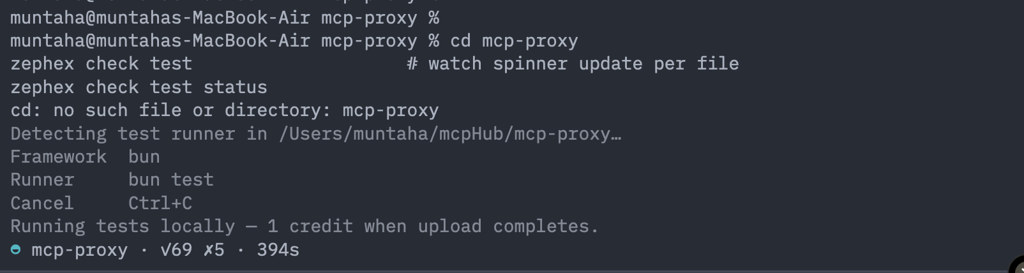
Long suite (~6 min) — spinner had ✓/✗ counts and elapsed time but not which file was running. This is what we fixed.
After — file name in spinner + scrollback
Detecting test runner in /Users/you/my-app…Framework bunRunner bun test --coverageCancel Ctrl+CRunning tests locally — 1 credit when upload completes. ◐ handlers.test.ts · 1 files · ✓12 ✗0 · 4s ▸ tests/handlers.test.ts · ✓12 ✗0 · 4s◓ mcp-tools.test.ts · 2 files · ✓57 ✗2 · 180s ▸ tests/mcp-tools.test.ts · ✓57 ✗2 · 180s◑ auth.test.ts · 3 files · ✓89 ✗2 · 240s ▸ src/__tests__/auth.test.ts · ✓89 ✗2 · 240s…Scroll lines also refresh every 12s during long gaps inside a single file (slow integration tests). Full details: Live progress in commands.
After the run — brief report (not raw logs)
zephex check test · mcp-proxy────────────────────────────────────────────────────────Runner bun test --coverage (auto-detected)Duration 340.7s Inventory 85 files · 771 tests · 21 skipped Result ✓ 749 ✗ 1 » 21 skipped FAIL Coverage Lines 48.5% (27,703 / 57,175 lines) 3 files at 0% coverage Failures (fix first) 1. mcp-http-express-hardening.test.ts › stateless mode still requires auth Test failed Rerun: bun test tests/mcp-http-express-hardening.test.ts -t "stateless mode…" Show more check test list all test files check test failures failure details only check test --full coverage + slow + skippedAfter tests fail — copy a fix prompt
Test Pulse builds a rich prompt for your AI agent: failing tests, file paths, Expected/Received, reproduce commands, and what to fix. No pass-rate fluff.
zephex check test fix-prompt --copy# Paste into Cursor / Claude Code — agent gets full failure context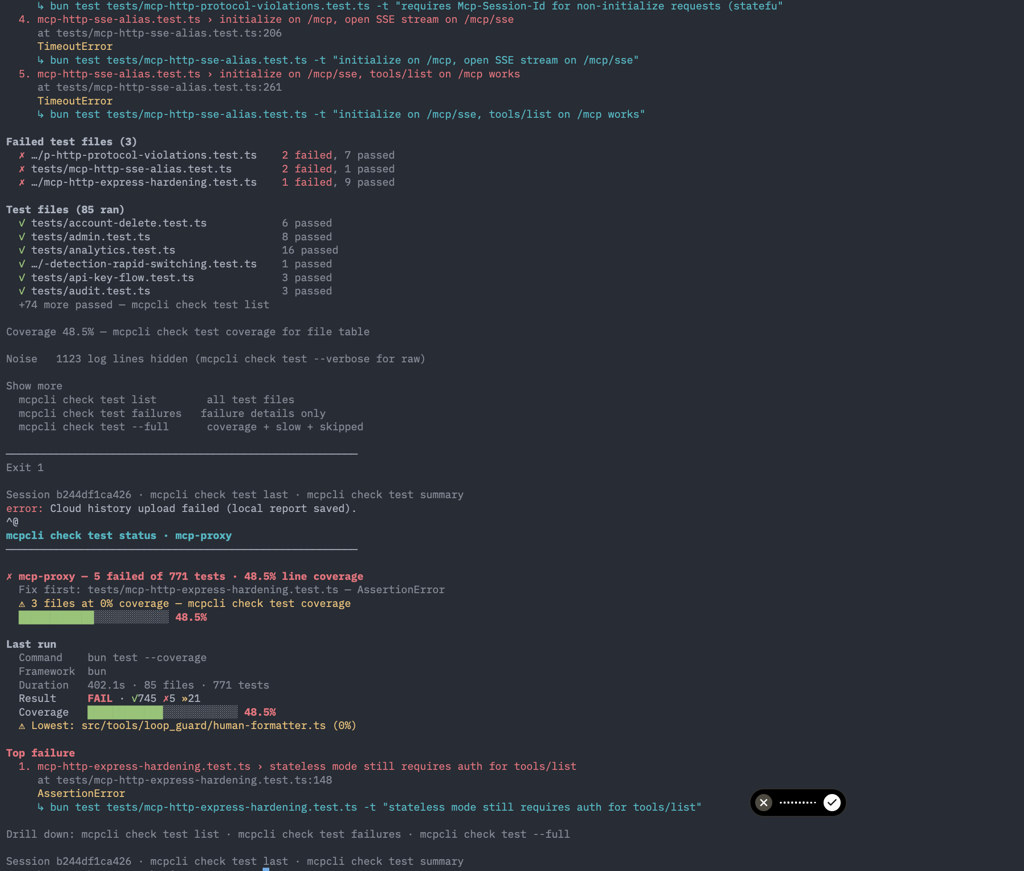
Failed run — brief report with green passed files, red failures, and Next steps footer pointing at fix-prompt --copy.
Most-used commands
zephex check test # brief summary + failureszephex check test learn # what commands do (terminal guide)zephex check test fix-prompt --copy # AI fix prompt → clipboardzephex check test --command "bun test src/foo.test.ts" # one filezephex check test --dry-run # show detected command (0 credits)zephex check test --failed-only # rerun last failureszephex check test --diff main # patch coverage on changed lineszephex check test --flaky # record + show flaky hintsZEPHEX_TEST_PULSE_FREE=1 zephex check test # dev: skip billingFull command list with every flag and subcommand: Test Pulse commands reference.
macOS, Linux, Windows
- macOS / Linux: Works in Terminal, iTerm, Cursor integrated terminal. Ctrl+C cancels via process-group kill.
- Windows: PowerShell or Git Bash; use
cd your-appthenzephex check test. - CI / agents: Use
--jsonfor machine-readable output; progress emits scroll lines on stderr.
Artifacts: .zephex/test-run/junit.xml and lcov.info (gitignored). Session cache: ~/.zephex/test-sessions/ (30 min) powers status, list, and failures without re-running.