Installation
HTTP vs stdio Transport
Both connect to https://zephex.dev/mcp and expose the same 10 tools. The published setup wizard (npx zephex setup) writes stdio for most editors so repo-aware tools can read your workspace; it writes hosted HTTP for Cursor and Claude Code only.
Tip: Let npx zephex setup pick transport — it matches mcp-proxy/src/commands/setup.ts. Manual config is only needed when skipping the wizard.
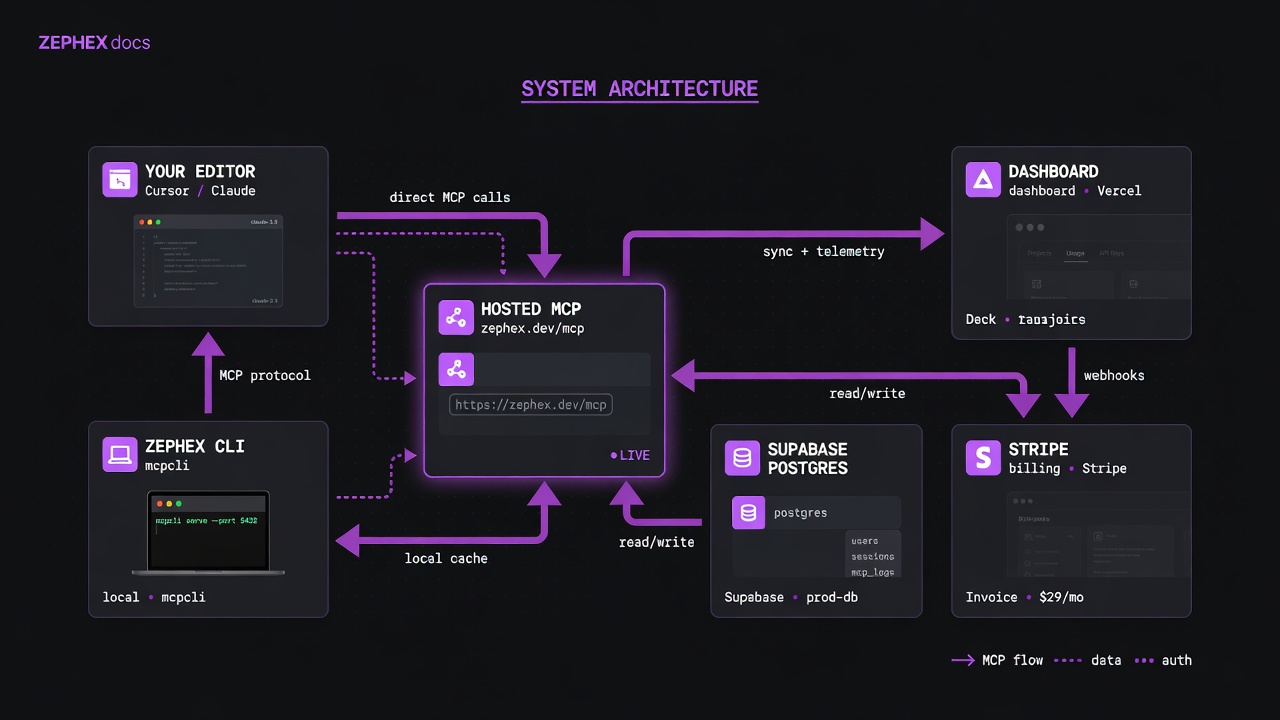
stdio bridge or direct HTTP — both land on the same hosted MCP after auth.
Editor agents receive lean JSON. Terminal humans get answer cards. Quota is shared.
Keys are hashed. Usage metadata is logged. Tool payloads are request-scoped. Terminal credentials stay on your machine.
| Mode | When | Shape |
|---|---|---|
| stdio | Most editors after setup; local file tools + stdio bridge | command: npx, args: [-y, zephex], env ZEPHEX_API_KEY |
| HTTP / streamable | Cursor / Claude Code HTTP shapes; some remote clients | url: https://zephex.dev/mcp, Authorization: Bearer … |
| Terminal Mode 2 | You in the shell — answer cards | mcpcli / zephex subcommands; key from ~/.zephex or flag |
- HTTPS only to zephex.dev — TLS for all client traffic.
- API keys hashed at rest; never log full secrets in production paths.
- Rate limits per key via Upstash-style sliding windows; 429 + Retry-After.
- Dashboard uses secure cookie flags on session auth; MCP uses Bearer keys.
- Tool allowlisting on the server — arbitrary tool names from clients are rejected.
- Local CLI credentials: ~/.zephex/credentials.json with restrictive file mode.
| Aspect | stdio (npx bridge) | Hosted HTTP |
|---|---|---|
| How it connects | Editor spawns npx -y zephex as child process; CLI forwards JSON-RPC | Editor talks directly to hosted endpoint with Bearer token |
| Local file access | Yes — CLI reads workspace for get_project_context, find_code, check_test | No local FS — pass github:owner/repo or absolute paths for repo tools |
| Node.js required | Yes — must be on PATH when IDE launches (GUI apps need repair hints) | No — editor only needs HTTPS |
| Setup writes for | VS Code, OpenCode, Windsurf, Zed, Continue, Kilo, and 15+ more | cursor, claude-code, crush |
| Best for | "Understand this repo" without typing paths | Editors with native remote MCP; package-only workflows |
| Pros | Repo-aware tools work out of the box; same key in env | No local process; simpler config; works when Node is unavailable |
| Cons | Requires Node on PATH; child process per editor session | Repo tools need explicit github: URLs; no automatic workspace indexing |
| Tools available | All 10 tools | All 10 tools (same endpoint) |
1. Are you using Cursor or Claude Code?
Yes → HTTP. Setup writes hosted HTTP automatically. Do not add a stdio entry alongside it.
2. Do you need repo-aware tools without typing paths?
Yes → stdio. VS Code, OpenCode, Windsurf, Zed, Continue, and most others use the npx bridge so get_project_context reads your workspace.
3. Is Node.js missing or unreliable on PATH?
Try HTTP manually in editors that support remote url — repo tools still work with github:owner/repo arguments.
4. Did an old install use the wrong transport?
Run repair. npx -y zephex@latest repair migrates filesystem editors to stdio without touching Cursor/Claude Code HTTP.
Common mistake: Registering both stdio and HTTP zephex in one config. Pick one transport per editor — duplicate entries cause missing or conflicting tools.
Your editor runs npx -y zephex as a child process. The CLI forwards JSON-RPC to the hosted backend and reads local files for repo-aware tools.
{ "mcpServers": { "zephex": { "command": "npx", "args": ["-y", "zephex"], "env": { "ZEPHEX_API_KEY": "mcp_sk_your_key_here" } } }}{ "servers": { "zephex": { "type": "stdio", "command": "npx", "args": ["-y", "zephex"], "env": { "ZEPHEX_API_KEY": "mcp_sk_your_key_here" } } }}EDITORS: SETUP USES STDIO
VS Code, OpenCode, Codex CLI, Gemini CLI, Antigravity, TRAE, Windsurf, Zed, Warp, Kiro, JetBrains, Factory Droid, Cline, Kilo Code, Continue, Copilot CLI, Claude Desktop, and more
The editor talks directly to https://zephex.dev/mcp with a Bearer API key — no local npx process.
{ "mcpServers": { "zephex": { "url": "https://zephex.dev/mcp", "headers": { "Authorization": "Bearer mcp_sk_your_key_here" } } }}SETUP WRITES HTTP FOR
Cursor, Claude Code, Crush (and claude mcp add --transport http when CLI is installed)
npx zephex repair migrates HTTP → stdio for filesystem editors. Cursor, Claude Code (global HTTP), and Crush stay HTTP by design.
npx -y zephex@latest repair pins stdio to zephex@latest, adds PATH hints for GUI-launched editors, fixes OpenCode command-array shape, and migrates legacy HTTP blocks to stdio for filesystem editors. It does not change Cursor, Claude Code global HTTP, or Crush.
CONTINUE
.continue/mcpServers/zephex.json or YAML in config
HERMES / KILO
YAML in ~/.hermes/config.yaml or kilo.jsonc
Transport is a wiring detail — billing, rate limits, and tool behavior are identical once connected.