Guides
Best Practices
Actionable checklist for getting better results from Zephex tools. Work through each section in order — the patterns below consistently outperform ad hoc tool usage.
Call get_project_context once at session start
Establish stack, auth method, hosting, and key entry points before any edits. Reuse the output for the rest of the session instead of re-reading package.json and config files.
Add explain_architecture when the task touches a critical area
For auth, billing, or database work, scope architecture to that area after context. Example: trace API key validation from inbound request to database lookup.
Ask for get_project_context with “summarize stack, auth flow, billing integration, and deployment targets,” then explain_architecture with “trace API key validation from request to database.” That grounds the agent before any code changes.
Call check_test before reading files
Describe the task in plain English. A good result returns the webhook handler, shared utility, and tests — not the entire billing surface. Example: "Add retry logging to Stripe webhook handling without touching unrelated UI."
Use read_code for symbols, not whole files
After check_test points to auth.ts, call read_code for validateApiKey instead of pasting the full file. You get the exact implementation and callers at a fraction of the token cost.
Search with find_code before building from scratch
Look for Retry-After, rate_limit, or existing toast helpers before assuming they do not exist. Prevents duplicate implementations and surfaces context the agent would miss.
See the live before/after at Token Efficiency — typical tasks drop from 56,700 → 1,190 tokens (47× reduction) when you scope and read symbols instead of dumping files.
Anchor multi-file bugs with keep_thinking
When several causes are plausible, keep_thinking tracks what was checked, ruled out, and what to inspect next. Example: "Docs page flashes unauthenticated state, then fails billing for signed-in users — rule out causes one by one."
Run audit_headers after every production deploy
Check TLS, security headers, cookie flags, and redirect behavior against the live URL. Missing HSTS or weak CSP becomes a blocking regression, not a manual browser check.
Use one API key per environment and per person
Create local-dev, staging, and production keys. Revoke a contractor's staging key when work ends instead of rotating the entire team's production access.
Follow the token-efficient tool order
get_project_context → check_test → find_code → read_code. This sequence usually keeps the first pass under a fraction of the cost of opening whole files.
Use find_code before read_code when still locating
If you do not know the file yet, search first. read_code is for when you already have a path or symbol name.
Reuse get_project_context output across the session
One call replaces reading package.json, tsconfig, and five config files manually. Do not repeat it unless the repo changed.
Use the Tool Reference decision tree to choose get_project_context vs check_test vs find_code as your first call. Editor integration matrices on Supported Editors show which capabilities matter most per editor.
Choose Zephex hosted when you need multi-editor teams
One key works everywhere with central audit, usage analytics, and key rotation. Stateful tools (keep_thinking) and live registry intel (check_package) run without shipping scanners to every laptop.
Choose local stdio only for air-gapped or single-machine setups
Air-gapped code, gigantic monorepos where every network hop hurts, or one editor on one machine where you maintain the process yourself.
Use audit_headers as a team release gate
Production URL checks after every deploy beat hoping each developer runs the right local servers.
See Zephex vs Running MCP Locally for full tradeoffs.
Start every unfamiliar repo with the token checklist order above. Verify live at /docs/playground or the MCP endpoint. Full specs and measured token numbers: /llms-full.txt.
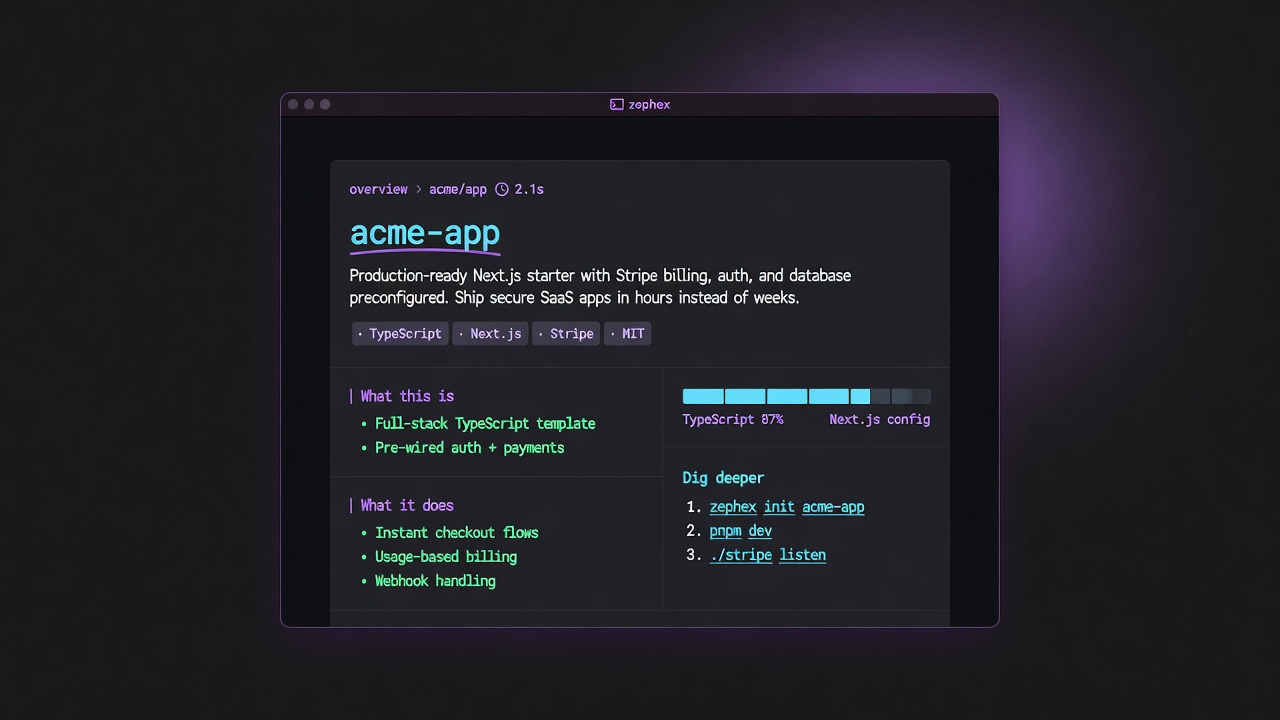
Prefer overview → find → summarize → check-test. Output is answer cards, not chat essays.
Editor agents receive lean JSON. Terminal humans get answer cards. Quota is shared.
| Rule | Do | Don't |
|---|---|---|
| Context once per session | get_project_context or overview first | Re-read package.json via ten read_code calls |
| Find before symbol | find_code then read_code / symbol | symbol without location on huge monorepos |
| Topic zoom | get-context --topic auth|database|env | Always pull full standard dump |
| Terminal vs agent | Human: answer cards; scripts: --json | Paste full terminal prose into agents |
| check_test session | run once, then failures/why on session_id | Re-run full suite for every question |
# Orientmcpcli overviewmcpcli get-context --topic auth # Locate → readmcpcli find-code "validateToken"mcpcli symbol validateToken # Verifymcpcli check-testmcpcli check url https://staging.example.com # Remember tribal knowledgemcpcli remember "webhooks dedupe event.id in Redis 24h"mcpcli recall webhook # Machine pathmcpcli get-context --json | jq .Bare words can mean more than one feature. Dispatch order in the CLI is product policy — not a bug. Prefer explicit flags when you need the other meaning.
| You type | CLI runs | If you wanted something else |
|---|---|---|
structure | structure (file map — free GitHub tree / local inventory) | mcpcli architecture for wiring · mcpcli overview for product story |
env | env-check (local env gaps) | mcpcli get-context --topic env |
upgrade (no args) | CLI self-update | mcpcli upgrade next or mcpcli check-package next --task upgrade |
test / check-test | check_test (Test Pulse) | Package named test → check-package test |
check url … | audit_headers | — |
secrets | supply --only secrets | — |
remember / recall | project_memory | Not package upgrade (loop-guard) |
loop-guard / audit | check-package --task upgrade | Prefer check-package --task upgrade |
Full maintainer table: /docs/cli-dispatch-policy.md (also in the monorepo under docs/cli-dispatch-policy.md).
Deep recipes: Tool workflows · Terminal Mode 2 · Usage limits policy · Data handling