Guides
Use Cases
Real developer jobs with both surfaces: editor agents (MCP tool names) and terminal humans (mcpcli). Same API key. Answer cards in the shell; lean JSON in chat.
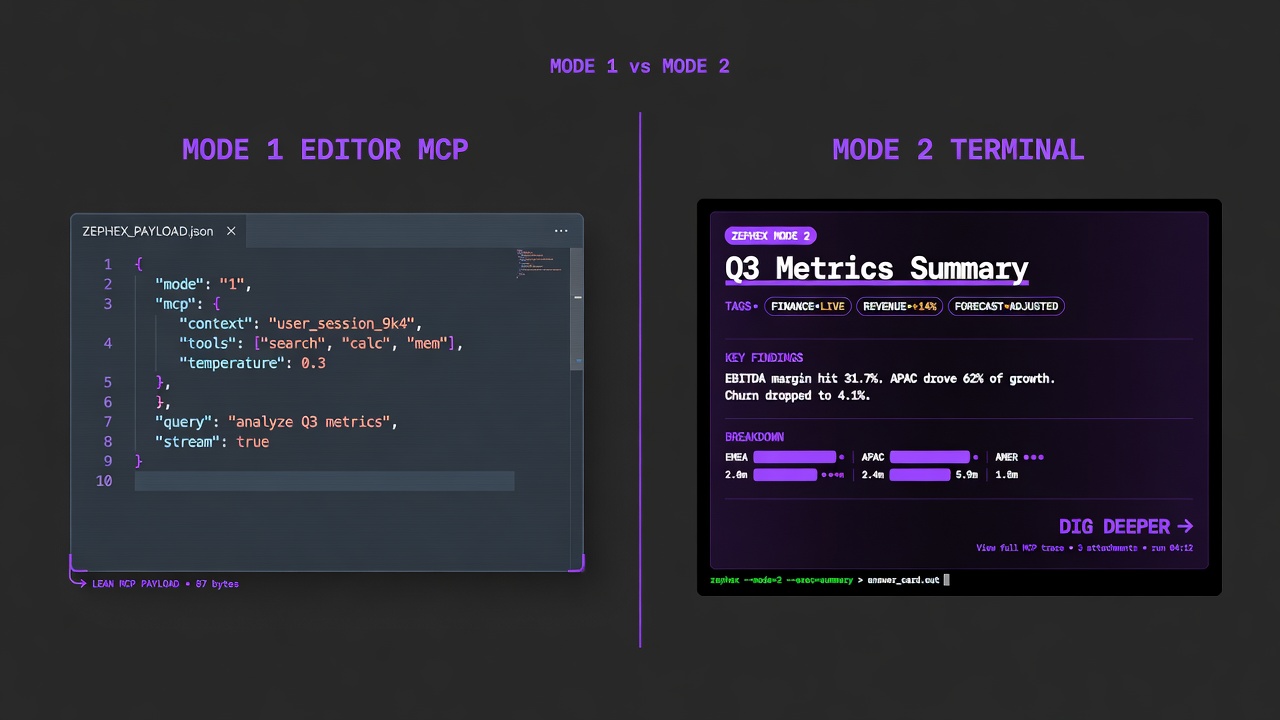
Same tools. Mode 1 for agents. Mode 2 for you in the terminal.
npm install -g zephexmcpcli initcd your-appmcpcli overviewmcpcli find-code "auth"mcpcli safe expressmcpcli check-testmcpcli check url https://example.commcpcli doctor| Command | What you get |
|---|---|
overview | Product story + stack bars |
get-context | Structured project brief |
find-code | Search symbols / strings |
summarize | Plain-English file read |
check-test | Run tests + failures |
safe | Package safety before install |
architecture | How modules wire |
check url | Live URL security audit |
remember | Save a project fact |
connect | Wire an editor MCP |
SCENARIO
You just joined a team and need to understand a large project quickly.
TOOLS
overview → get_project_context → explain_architecture → find_code
HOW IT WORKS
overview (or get-context) gives the product story and stack. architecture maps services. find-code lands on auth, billing, or the domain you care about.
mcpcli overviewmcpcli get-contextmcpcli architecturemcpcli find-code "middleware"RESULT
You orient in minutes with answer cards — not a day of random file opens.
SCENARIO
Dependabot opened a PR to bump Next.js. You need blast radius.
TOOLS
check_package task=upgrade → deps → check_test
HOW IT WORKS
check-package --task upgrade surfaces breaking changes. deps scans your lockfile/direct deps. check-test runs the suite after you plan the bump.
mcpcli check-package next --task upgrade --from-version 14.2.0mcpcli depsmcpcli check-testRESULT
Breaking-change intel + live test health before merge.
SCENARIO
Users report 500s on /api/checkout.
TOOLS
keep_thinking → find_code → read_code → audit_headers
HOW IT WORKS
think structures hypotheses. find + symbol/summarize open the handler. check url audits staging/prod headers if it might be CORS/TLS.
mcpcli think "checkout 500 after payment intent"mcpcli find-code "checkout"mcpcli symbol handleCheckoutmcpcli check url https://api.example.com/api/checkoutRESULT
Systematic path: reason → locate → read → live probe.
SCENARIO
A tutorial or AI recommends a package you have never heard of.
TOOLS
check_package (safe)
HOW IT WORKS
safe / check-package hits the live registry: exists, CVEs, postinstall, typosquat, downloads.
mcpcli safe weird-package-namemcpcli check-package lodash --task securityRESULT
Catch hallucinations and supply-chain junk before package.json.
SCENARIO
Extract auth into its own module — what breaks?
TOOLS
find_code everywhere → architecture → check_test
HOW IT WORKS
rename/usages list every site. architecture shows the auth boundary. check-test validates after edits.
mcpcli rename "AuthService"mcpcli architecture --focus authmcpcli check-testRESULT
Impact map before you move files.
SCENARIO
PR adds a new API endpoint and a dependency.
TOOLS
read_code → check_package → audit_headers
HOW IT WORKS
summarize the new route file. safe/check the new dep. after staging deploy, check url.
mcpcli summarize src/app/api/new/route.tsmcpcli safe new-depmcpcli check url https://staging.example.comRESULT
Code quality + dependency safety + live headers.
SCENARIO
You learned webhook idempotency is Redis, not Postgres unique keys.
TOOLS
project_memory remember → later recall
HOW IT WORKS
remember stores the decision. Next session, recall pulls it without re-discovering.
mcpcli remember "webhooks dedupe event.id in Redis 24h"mcpcli recall webhookRESULT
Tribal knowledge survives agent sessions. (Not loop-guard / package upgrade.)
Monorepo: only the package you care about
Repo root has many apps; you work in apps/web.
cd apps/web or pass --cwd apps/web so local inline_files targets the right package.json and src tree.
mcpcli get-context --cwd apps/webmcpcli find-code "AuthProvider" --cwd apps/webResult: No more hits from the wrong workspace package.
Public OSS without cloning
You want a brief on a GitHub repo you have not cloned.
Pass github:owner/repo or use the dashboard web terminal with a public URL.
mcpcli get-context github:vercel/next.jsmcpcli overview --path github:vercel/next.jsResult: Stack and layout without a local checkout.
CI / scripts want JSON
Pipe tool output into jq or a bot.
Human answer cards are default; --json is agent parity.
mcpcli get-context --json | jq .mcpcli safe express --jsonResult: Stable machine-readable payload.
Step tables with agent + terminal for each deep recipe live on Tool Workflows. Highlights:
- Onboard a new clone in 10 minutes — You just cloned a repo and need the product story, stack, and where auth lives.
- Before you npm install anything — A tutorial or AI suggested a package you have never used.
- Debug 401 on protected routes — Signed-in users still get 401 after a middleware change.
- Before you ship / after deploy — Staging is up — confirm tests and live security surface.
- Capture tribal knowledge across sessions — You learned something scanning cannot: webhook idempotency lives in Redis, not the DB.
- Safe rename across the repo — Rename OldService → NewService without missing a call site.
Quickstart (editor) · CLI without agent · Terminal Mode 2 · How it works