CLI
Zephex CLI without an AI agent
Run Zephex hosted tools in your terminal — no chat UI, no agent loop. Type zephex overview or mcpcli overview; they are the same binary. Same API key as Cursor or Claude Code.
Only want to watch videos or connect in Cursor? You are on the Terminal CLI page — skip Node/mcpcli here. Setup video (0 MB download) · Connect MCP · Quickstart
Two names, one CLI
After install you get both commands. They are not two products. The installer links zephex and mcpcli to the same file. Use the product name if that is easier to remember. Use mcpcli if that is what you already typed last month. Nothing breaks if you mix them in one terminal.
zephex overviewmcpcli overview # same CLI, same result zephex loginmcpcli login # same CLI, same result zephex doctormcpcli doctor # same CLI, same result zephex update --checkmcpcli update --check # same CLI, same result zephex usagemcpcli usage # same CLI, same resultExtra aliases (same file again): zepx zphx mcpz zepcli zephx. You never have to memorize those. Slash commands inside the TUI (/overview) do not care which binary you launched.
Zephex CLI is a terminal product that talks to the same hosted intelligence as your editor MCP — but answers in plain English for humans. You install once, sign in once, then run short commands from any project folder: stack brief, find a symbol, outline a file, check if a package is safe, run tests, or audit a live URL. No agent loop required.
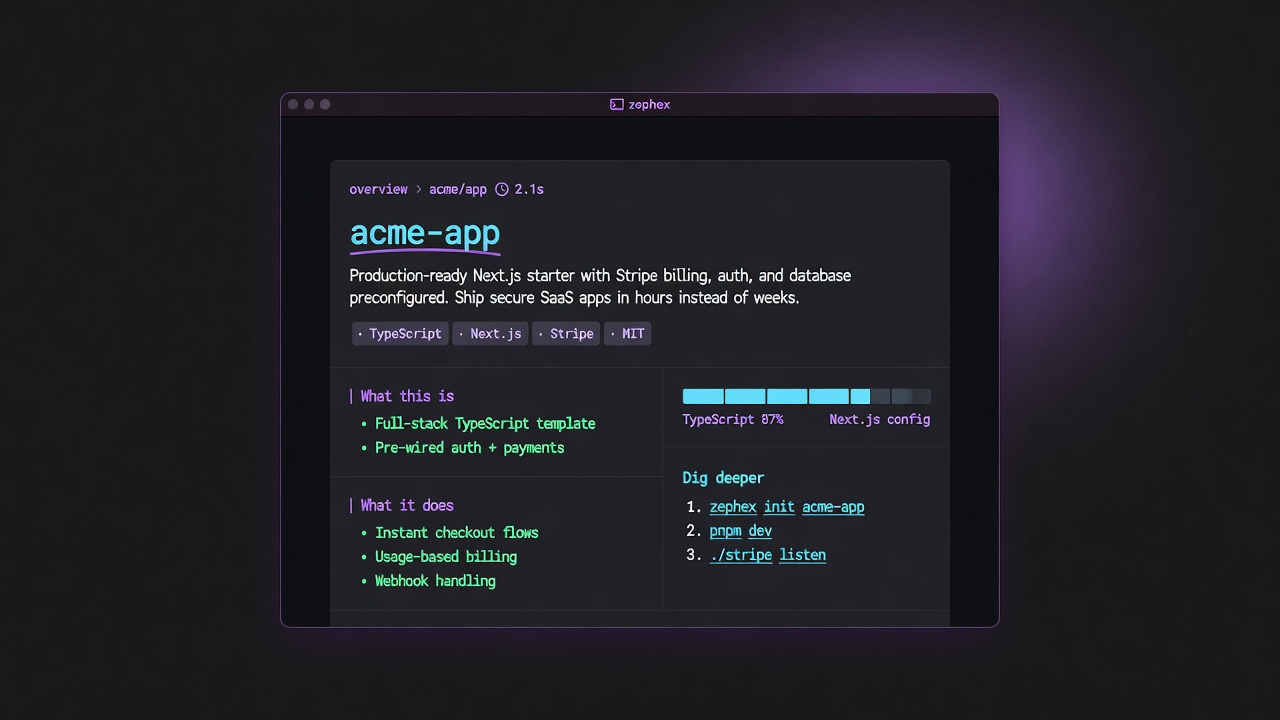
What a good Mode 2 reply looks like: short hero, plain English, · tags, │ sections, numbered Dig deeper — not a wall of chat.
The craft: answer cards, not chat dumps
Mode 2 is designed like a senior engineer sitting next to you — not like a chat model monologue. Each successful tool prints a structured answer card:
Hero first
Project name, package name, or search query in high contrast — so you know what you’re looking at in half a second.
Plain English story
Two to four sentences on what it is and how you’d use it. Badges and marketing noise are stripped before display.
· tags + │ rails
Stack, license, and scale as a quiet tag strip. Sections use a left rail so your eye can scan What this is / What it does / Getting started.
Dig deeper
Numbered next commands (architecture, find-code, setup…) so you never dead-end after one answer.
Honesty
If a section has no real data, it is dropped — Zephex does not invent stack or print “none detected” filler.
Human ≠ agent
Default output is the card. Pass --json when you want the same lean payload your editor agent sees.
| Who | When | Try |
|---|---|---|
| Solo builders | Before opening the editor — orient on a new clone in under a minute. | mcpcli overview |
| Teams onboarding | Hand a new hire five commands instead of a 40-page wiki. | mcpcli get-context · mcpcli architecture |
| Security-minded deploys | Before npm install, or after shipping a public URL. | mcpcli safe express · mcpcli check url https://your.app |
| Monorepo maintainers | Point tools at one package without losing the root workspace. | mcpcli find-code "auth" --cwd apps/web |
| CI / scripts | Pipe machine-readable results into bots or logs. | mcpcli get-context --json · mcpcli deps --json |
| Editor users who also live in the shell | Same API key as Cursor / Claude — terminal for speed, MCP for multi-step agent work. | mcpcli setup --cursor then mcpcli find-code "…" |
# 1) Install (no Node required)curl -fsSL https://zephex.dev/cli/install.sh | bashsource ~/.zephex/env.sh# Windows: irm https://zephex.dev/install.ps1 | iex # 2) Sign in (browser → saves ~/.zephex/credentials.json)zephex init --terminal# or: zephex login # 3) Stand in a real project (package.json + source)cd ~/projects/my-app # 4) First answers — plain English cardsmcpcli overviewmcpcli get-contextmcpcli find-code "auth"mcpcli safe expressmcpcli check-test # 5) Optional: wire an editor toomcpcli connect --cursor # 6) Healthmcpcli doctormcpcli usageLearn these ten first. Everything else is aliases, Power Mode, or Pulse product lines.
| Command | What you get |
|---|---|
overview | Product story + stack bars + how to run |
get-context | Structured project brief (topics: auth, database, …) |
find-code | Search symbols, strings, renames |
summarize | Plain-English file read (read_code) |
check-test | Run tests + failures / why |
safe | Is this npm package safe to install? |
architecture | How the app is wired |
check url | Live URL header / TLS audit |
remember | Save a project fact for later sessions |
connect | Wire Cursor / VS Code / Claude / 22+ editors |
New repo clone — “what is this?”
- cd into the app (or apps/web in a monorepo)
- mcpcli overview — product story, size, how to run
- mcpcli get-context — stack, scripts, env names
- mcpcli architecture — how modules wire together
cd my-appmcpcli overviewmcpcli get-contextmcpcli architecture --focus authFind a symbol, then read it
- mcpcli find-code "validateToken" — ranked hits
- mcpcli symbol validateToken — AST body
- mcpcli summarize src/lib/auth.ts — plain-English file brief
mcpcli find-code "validateToken"mcpcli symbol validateTokenmcpcli summarize src/lib/auth.tsBefore you npm install
- mcpcli safe <pkg> — CVEs + registry risk (no project required)
- mcpcli check-package next --task upgrade --from-version 14.2.0
- mcpcli deps — scan every direct dependency in package.json
mcpcli safe lodashmcpcli check-package next --task upgrade --from-version 14.2.0mcpcli depsSTEP 1
You type a short command (or plain English)
Intent routing maps typos and phrases to the right tool — no LLM in the loop for routing. Example: mcpcli "tell me about my project" → get-context.
STEP 2
Local project is indexed from your disk
By default Zephex uploads manifests + a bounded file set (inline_files) from your current folder — private repos work without a public GitHub URL.
STEP 3
Hosted tools analyze at zephex.dev/mcp
Same API key as editor MCP. Usage counts toward your plan. Failures on empty folders fail fast so you do not burn quota from ~.
STEP 4
Terminal renders an answer card
Hero, plain English, tags, sections, Dig deeper. --json skips the card and prints the agent payload.
On a TTY, bare mcpcli opens a shell. Type / for the palette — Tab fills, Enter runs.
mcpcli # bare + TTY → interactive shell, type //overview # slash palette (Tab to fill, Enter to run)/find auth/safe express/login # if not signed inmcpcli help terminal # full Mode 2 alias listmcpcli learn find_code # per-tool guide, no API call| Mistake | Fix |
|---|---|
| Running from ~ or /tmp | cd into a folder with package.json (or pyproject.toml / go.mod) first. |
| Expecting full monorepo search from the root always | Use mcpcli … --cwd packages/api or cd into the package you care about. |
| Confusing remember with package upgrade | remember/recall = project_memory facts. Package upgrades = mcpcli check-package --task upgrade (legacy: loop-guard). |
| Assuming multi-turn think works like the editor | Terminal mcpcli think is one-shot. Full keep_thinking sessions with sessionId are editor MCP. |
| Using an old global binary | mcpcli update --apply or re-run curl -fsSL https://zephex.dev/cli/install.sh | bash — then mcpcli doctor. |
This section is for people who want npx zephex in Terminal. If you only wanted videos or editor connect, use the links at the top instead.
mcpcli, npx zephex, and npm install -g zephex are Node.js programs. They need Node.js 22+ and npm on your PATH (or Node inside Docker). Zephex in the browser or in an editor over HTTPS does not replace that for terminal Mode 2.
Quick answer: Most people should install Node.js LTS, restart the terminal, then run npm install -g zephex && mcpcli setup. Pick another row in the table only if Node or global install is not possible on your machine.
Recommended if you have nothing installed yet: official Node.js LTS from nodejs.org or skip Node entirely with the curl installer (~3 MB CLI tarball). npm install -g zephex currently unpacks ~260 MB of unused deps — prefer curl.
# Best download — no Node required (~3 MB CLI; +~50 MB Node only if missing)curl -fsSL https://zephex.dev/cli/install.sh | bash # Already have Node 22.5+ and want editor MCP only:npx -y zephex@latest setup --cursor # Avoid until slim publish: npm install -g zephex / bare npx zephex# Those currently also install unused server libraries (~260 MB).| What you download | Approx. download | After install on disk |
|---|---|---|
| Node.js LTS (Windows .msi) — best base for most users | ~30 MB | ~100–250 MB |
| Node.js LTS (macOS .pkg) | ~84 MB | ~100–250 MB |
zephex CLI only (npm install -g zephex) | ~3 MB | ~260 MB in npm cache |
| npx zephex setup (no global install) | Same ~3 MB CLI on first run | Cached under ~/.npm; no separate “Zephex app” installer |
Docker node:22-alpine (no local Node) | ~45–60 MB image pull | Docker Desktop ~500+; image ~45–60 MB |
| Editor-only MCP (HTTPS + API key) | 0 MB CLI — config only | No Node required on laptop |
Sizes vary slightly by Node version and OS. You are not downloading a large IDE or a multi-GB SDK — just Node (if needed) and a small npm package. Tools run against https://zephex.dev/mcp; your project code is not uploaded as a full repo by default.
Step 1 — check what you already have:
node -vnpm -vwhich nodewhich npmv18.x,v20.x, orv22.x→ you are ready; skip to after Node is installed.command not found→ Node is missing; install below or use Docker / editor-only.v16or lower → upgrade Node; the CLI requires 22+.
Step 2 — pick the best path for you:
| Your situation | Best option | Notes |
|---|---|---|
| New user, can install software | Node.js LTS + npm install -g zephex && mcpcli setup | Recommended. Shortest commands: mcpcli, zepx, zephex. |
| Have Node, try before installing globally | npx zephex setup | ~5s first download; nothing permanent except credentials. |
| Use Bun instead of Node day-to-day | bun install -g zephex | Still a JS runtime; see Bun block below. |
| Use pnpm | pnpm add -g zephex | Same CLI; see pnpm block below. |
| No Node on host; Docker allowed | Docker + npx in container | Mount $HOME so credentials survive. |
| No Node, no Docker; only Cursor / Claude | Editor MCP (HTTP) | Mode 1 in editor — not the same as terminal mcpcli tools. |
| Corporate laptop, no installs | Manual JSON config | Paste MCP config + API key; setup wizard optional on another machine. |
| Only need terminal tools occasionally | npx zephex … per command | Needs Node each time; no global PATH entry. |
Download the LTS installer if you are unsure — it includes npm. After install, close and reopen your terminal (required on Windows so PATH updates).
# macOS — recommended for most users# Option A: Homebrew (developers)brew install node # Option B: Official LTS installer (everyone)# Download from https://nodejs.org/en/download# Run the .pkg, then restart Terminal # Option C: Version manager (multiple Node versions)# fnm: https://github.com/Schniz/fnm# nvm: https://github.com/nvm-sh/nvm# Windows — recommended for most users# Option A: winget (Windows 10/11)winget install OpenJS.NodeJS.LTS # Option B: Official LTS installer# https://nodejs.org/en/download — check "Add to PATH" during install# Then open a NEW Command Prompt or PowerShell window # Verify (new window):node -vnpm -v# Linux — pick one# Option A: NodeSource (Debian/Ubuntu)curl -fsSL https://deb.nodesource.com/setup_22.x | sudo -E bash -sudo apt-get install -y nodejs # Option B: Distro packages (may be older — need v18+)# sudo apt install nodejs npm # only if version >= 18 # Option C: nvm (no sudo, per-user)# curl -o- https://raw.githubusercontent.com/nvm-sh/nvm/v0.40.1/install.sh | bash# nvm install --lts# nvm use --ltsStep 3 — after Node works, run Zephex setup:
npm install -g zephex && mcpcli setupWithout global install (still needs Node + npm for npx):
npx zephex setupnpx -p zephex mcpcli setupThese still require a JavaScript runtime on the machine — not a substitute for “no Node at all.”
bun install -g zephexmcpcli setup# or one-shot:bunx zephex setuppnpm add -g zephexmcpcli setup# or one-shot:pnpm dlx zephex mcpcli setupNo Node on this computer? Use Docker (Node runs inside the image) or editor-only MCP. Docker still requires Docker Desktop / Engine on the host.
# Docker Desktop or Engine required on the hostdocker pull node:22-alpine # Setup (writes ~/.zephex + editor configs on YOUR machine)docker run -it --rm \ -v "$HOME:/root" \ -w /root \ node:22-alpine \ npx -y zephex setup # Terminal tool in your repo (mount project folder)cd /path/to/your-appdocker run -it --rm \ -v "$HOME:/root" \ -v "$(pwd):/work" \ -w /work \ node:22-alpine \ npx -y zephex get-contextOptional alias so daily commands look like local mcpcli:
# ~/.bashrc or ~/.zshrc — shorter daily commandsalias mcpcli='docker run -it --rm -v "$HOME:/root" -w "$(pwd):/work" -w /work node:22-alpine npx -y zephex' mcpcli setupmcpcli get-contextFull CLI in Docker guide · Windows paths: use %USERPROFILE% instead of $HOME in -v mounts.
If you only want MCP tools inside Cursor or Claude Code and never run commands in Terminal, you can connect over HTTPS without installing Node on your laptop. Terminal Mode 2 (mcpcli get-context, etc.) still needs Node or Docker somewhere.
# No local Node needed for Cursor / Claude Code (hosted HTTP)# 1. Create a key: https://zephex.dev/dashboard/api-keys# 2. In Cursor: Settings → MCP → add server URL:# https://zephex.dev/mcp# Header: Authorization: Bearer YOUR_API_KEY# Or run setup on ANY machine that has Node once, copy the key into the editor. # Full wizard (needs Node somewhere once):# mcpcli setup --cursor# "command not found: node" or "command not found: npx"# → Node is not installed OR not on your PATH.# Fix: install LTS from nodejs.org, restart terminal, run node -v again. # "mcpcli: command not found" after npm install -g# → Global npm bin not on PATH, or install did not finish.# Fix: npm install -g zephex# npm bin -g # add this folder to PATH# Or skip global: npx zephex setup # EACCEs / permission denied on npm install -g (macOS/Linux)# Fix: mkdir -p ~/.npm-global && npm config set prefix ~/.npm-global# Add to ~/.zshrc: export PATH="$HOME/.npm-global/bin:$PATH" # Old Node (v16 or below)# Fix: upgrade to Node 22.5+ — or use curl install.sh, which bundles Node.| Question | Answer |
|---|---|
| Do I need Node.js to use Zephex at all? | Not for the curl installer — it bundles Node 22 under ~/.zephex if needed. npx / npm / bun still need Node 22.5+ on PATH. Editor MCP over HTTPS can work with only an API key. |
| What is the best install for a new user? | curl -fsSL https://zephex.dev/cli/install.sh | bash — then source ~/.zephex/env.sh. That works with or without Node. Use npx zephex setup --cursor only when you already have Node 22.5+ and want editor MCP. |
| I cannot install software on my work laptop. | Use editor-only MCP (manual JSON or dashboard key) — see Install methods → Manual JSON. Or run setup once on a personal machine, copy the API key, paste into work editor config. Terminal CLI on the work machine may be blocked without Docker approval. |
| I have Node for another project — is that enough? | Yes, if node -v shows v22.5 or higher. Below that, use the curl installer — it downloads a private Node 22 instead of failing. |
| Does the AI editor install Node for me? | Sometimes. Cursor/VS Code may bundle npx for MCP stdio configs, but that does not put mcpcli on your system PATH for Mode 2 terminal use. For terminal tools, install Node yourself or use Docker. |
| Docker still needs something installed? | Docker Desktop (or docker CLI) on the host — not Node. The container image includes Node and runs npx zephex for you. |
| How many MB will this download? | curl installer: ~3 MB CLI tarball, plus ~50 MB Node only if you are below 22.5. npm install -g zephex / npx zephex currently also pull unused server libraries (~260 MB, ~2 minutes) until the slim package is published. Docker is a ~50 MB Node image plus that same npm package. |
| What is the best way to download if I have nothing installed? | curl -fsSL https://zephex.dev/cli/install.sh | bash. If you cannot run curl|bash, use editor-only MCP (paste a key into Cursor) or the web terminal. Do not start with npm install -g until the slim package is on npm. |
More: Install methods (all 6) · Connect MCP · CLI in Docker · npx zephex
Project topic commands
These are the commands this CLI is built around. They are not extra MCP tools — they are get_project_context slices (same tool as /overview / /context). In a local project they read disk (tables, pages, auth files, scripts) and print a long card. They need a live API key. They do not spend the hosted ~7-credit context call when the folder is on your machine.
Download, then run
curl -fsSL https://zephex.dev/cli/install.sh | bashsource ~/.zephex/env.shcd your-appzephex login # once — live API keyzephex # type /Full OS notes: install methods · macOS · Linux · Windows. Upgrade later with zephex update.
# in the shell (after zephex)/overview/frontend/auth/database/start # same commands from argvzephex overviewzephex frontendzephex frontend --agentzephex authzephex databasezephex startzephex package express| You type | What a good card says | Not for |
|---|---|---|
/overview | Product story, stack, size, how to run | Table list or file tree |
/frontend | UI stack, ~N files, pages grouped (App / Auth / Billing) | Calling Express the UI |
/auth | Provider, env names, real files (middleware, oauth) | Full request graph — use architecture --focus auth |
/database /data | Provider, folder + file count, migration count, table names | Dumping every .sql file |
/start | Install + real dev / test / build commands | Account login — that is /setup |
--agent prints FACTS / NEXT / GAPS only (short on purpose). /help lists all 10 MCP tools and these slashes. Type /t for test, /p for package, /d for database.
Also: slash reference · argv reference · Mode 2 guide
Browser sign-in on zephex.dev — then ~/.zephex/credentials.json is written for you. You do not paste JSON to log in.
# Best — no Node required (Mac / Linux / WSL / Cloud Shell)curl -fsSL https://zephex.dev/cli/install.sh | bashsource ~/.zephex/env.shzephex init --terminal # Windows PowerShell# irm https://zephex.dev/install.ps1 | iex # Already have Node 22.5+ — terminal onlynpx -y zephex@latestzephex login # Already have Node — editor MCP (Cursor / Claude / …)npx -y zephex@latest setup --cursorSame tool, different prefix — after install, any of these run get-context:
mcpcli get-contextzephex get-contextzepx get-contextzphx get-context# all same binary after curl install or npm install -g zephex| I want to… | Run this | What happens |
|---|---|---|
| Use MCP in the terminal only (no AI agent) | curl …/install.sh | bash then zephex login | Browser / QR sign-in → key saved to ~/.zephex/credentials.json. Does not edit Cursor/VS Code MCP files. |
| Use MCP inside Cursor / Claude / VS Code | mcpcli setup --cursor (or your editor flag) | Writes that editor's MCP config (often mcp.json or .vscode/mcp.json) — agent calls tools in chat. |
| Both terminal and editor | mcpcli setup --cursor then use terminal tools too | One API key, same account — not two products. |
| Sign out of terminal CLI only | mcpcli logout | Deletes ~/.zephex/credentials.json only. Editor MCP can keep working. |
| Remove Zephex from an editor | mcpcli disconnect --cursor | Edits editor config + revokes key — not the same as logout. |
| Machine-readable output (CI/scripts) | mcpcli get-context --json | --json is output format only — not a login method or JSON-file sign-in. |
login is an alias for setup (same browser flow). Details: Account & logout.
No Node? curl -fsSL https://zephex.dev/cli/install.sh | bash. Already have Node 22.5+? npx -y zephex@latest (terminal) or npx -y zephex@latest setup --cursor (editor). Install & upgrade. Same CLI: mcpcli, zepx, zphx, mcpz, zepcli, zephx, or zephex (after npm i -g zephex).
These are the bugs people actually hit when installing or when an agent runs setup. Full install/upgrade page: Install & upgrade the CLI.
| What you see | Why | Fix |
|---|---|---|
command not found: zephex | curl | bash cannot change PATH in the parent shell. | source ~/.zephex/env.sh then open a new tab. which zephex should be ~/.zephex/bin/zephex. |
npx zephex setup hangs or is huge (~260 MB) | Published npm zephex still lists unused server deps. npx installs them. | Use curl -fsSL https://zephex.dev/cli/install.sh | bash (~3 MB). Then zephex connect --cursor if you want the editor. |
Node 18 / 20 — engines error | npx/npm/bun need Node 22.5+. Cloud Shell and many laptops are still 20. | Do not upgrade Node just for us. Run the curl installer — it bundles Node 22 under ~/.zephex/node. |
Agent says 0 tools / old tool names | Stale npx cache or Grok/editor cached descriptors (23 files vs 10 live tools). | npx -y zephex@latest doctor then repair. Grok: rm cached zephex tool JSON, grok mcp doctor zephex. |
Login opened but CLI still “not signed in” | QR/browser completed, poll did not write credentials, or you ran a different binary than the one that started login. | zephex login or mcpcli login on the same machine. Check ~/.zephex/credentials.json exists (do not paste the key into chat). |
Editor works, terminal does not (or the reverse) | Editor MCP config and ~/.zephex/credentials.json are separate. | Terminal: zephex login or mcpcli login. Editor: npx -y zephex@latest setup --cursor (or --claude). Same account. |
HTTP MCP but find/read cannot see local files | Hosted HTTPS cannot read the laptop disk. Cursor HTTP is fine for some tools; file tools need stdio. | zephex repair — switches filesystem editors to stdio (npx -y zephex). |
Windows: bash installer failed | cmd.exe cannot run the Mac/Linux script. | PowerShell: irm https://zephex.dev/install.ps1 | iex. WSL: use the curl line inside WSL, not on the host. |
Mixed C:\Users\… and /home/you/.zephex | Windows host and WSL are two installs. | Install once in the environment that actually runs the shell or the editor. |
doctor: CLI install is ~260 MB | Old npm install -g left unused packages under ~/.zephex/npm-global. | Re-run the curl installer. Credentials stay. voice-venv is unrelated (optional STT). |
curl -fsSL https://zephex.dev/cli/install.sh | bashsource ~/.zephex/env.shzephex init --terminal cd ~/projects/my-appzephex overview # same: mcpcli overviewmcpcli overview # identicalzephex get-context # same: mcpcli get-contextzephex find-code "validateToken"mcpcli summarize src/lib/auth.tszephex check-testmcpcli safe expresszephex architecturezephex usagemcpcli usagezephex doctormcpcli doctorHelp: npx zephex help terminal · npx zephex cli-guide
No AI agent in the loop. Your shell runs npx zephex; the CLI uploads a search index from disk (inline_files) and calls the same hosted endpoint as your editor.
From project research (see mcp-proxy/summary.md and docs/CLI-MODE2-COMPLETE-GUIDE.md): three principles apply.
- Two modes, one account — Mode 1 is your editor agent calling tools; Mode 2 is you in the shell. Same key, same endpoint:
https://zephex.dev/mcp. - Server detects, CLI uploads — The CLI sends manifests + a file index; hosted analysis does not replace reading your private repo from GitHub unless you pass
--path github:o/r. - All 10 MCP tools have terminal commands — including
check url(audit_headers) andcheck-test. Only multi-turnkeep_thinkingsessions stay editor-only; terminalthinkis one-shot.
| Category | Count | Where documented |
|---|---|---|
| Account & meta (setup, logout, doctor, help, …) | 41 | CLI commands · Account & logout |
| Terminal MCP tools (hosted) | 10 (all 10) | This page · Terminal reference |
| find_code aliases alone | 31 | npx zephex find-code --help |
| read_code aliases | 31 | npx zephex read-code --help |
| get_project_context topics + typos | 50+ | npx zephex cli-guide project |
| Natural language (quoted phrase) | unlimited routing | npx zephex "find auth middleware" |
| MCP tool | Primary CLI | Aliases | Example | Needs project folder? |
|---|---|---|---|---|
get_project_context | get-context | 50+: overview, frontend, auth, database, start, context, stack, … | mcpcli frontend | Yes |
find_code | find-code | 31: find, search, grep, rename, everywhere, usages, defs, where, … | mcpcli find-code "auth middleware" | Yes |
read_code | summarize / outline / symbol | 31: read-code, read, explain, show, files, peek, … | mcpcli outline src/lib/auth.ts | Yes |
explain_architecture | architecture | 6+: arch, explain-architecture, structure | mcpcli architecture --focus auth | Yes |
check_test | check-test | 9: scope, plan, files-for, touch, scope-task | mcpcli check-test "add Stripe webhooks" | Yes |
keep_thinking | think | 3: reason, debug-think (one-shot in terminal) | mcpcli think "debug 401 after refresh" | No |
check_package | check-package | 13: check, safe, lookup, pkg, package | mcpcli safe express | No |
project_memory | remember / recall / memory | 3 slashes: /memory, /remember, /recall | mcpcli remember "auth uses Supabase JWT" | No |
audit_headers | check url | 6+: site-audit, audit-headers, /check-url | mcpcli check url https://zephex.dev --deep | No |
Zephex_dev_info | docs | 2: /docs | mcpcli docs "Stripe webhooks" | No |
Editor-only (still part of the same MCP server after setup):
keep_thinking (multi-turn)— Terminal has one-shot think/reason/debug-think; sessionId checkpoint flows are editor-only.
| Command | Aliases | What it does |
|---|---|---|
init | onboard, getting-started | First-run wizard: prereq checks → zephex.dev/cli/auth → terminal + optional editor |
setup | login, sign-in, connect | Browser OAuth → API key → editor MCP config + ~/.zephex |
connect | — | Alias for setup — connect MCP to any of 22+ editors |
logout | sign-out | Delete ~/.zephex; --all also disconnects every editor |
disconnect | remove | Remove Zephex from editor JSON; revoke key server-side |
reconnect | — | disconnect --quiet + fresh setup (--cursor, --claude-code, --vscode, …) |
reset | — | disconnect + remove skill/rule files |
status | — | Live MCP tools/list per installed editor config |
list | ls | Every supported editor — installed or not |
doctor | — | Node, network, MCP reachability, project index, API key |
keys | — | Masked keys + usage; links to dashboard |
usage | stats | Per-tool call counts this billing month |
tools | — | List / enable / disable MCP tools in editor config |
skills | — | Install or upgrade agent skill + rule markdown |
info | version, -v | Package version and install path |
help | -h, --help | Full reference; topics: terminal, tools, setup |
cli-guide | guide, howto | Mode 2 deep guide (topics: project, auth, monorepo, …) |
learn | commands | Per-tool terminal guide (no MCP call); index or learn find_code |
compass | — | Command Compass — guide when input doesn't match a command (no MCP call) |
ask | — | Natural-language router to find, context, package, architecture |
deps | dependencies | Scan all direct deps in package.json (batch check_package) |
compare | vs | Side-by-side package intel for two npm packages |
history | hist, again, repeat | Local command log; re-run with history N or again |
update | upgrade (no args) | Check npm latest; --apply runs npm install -g zephex@latest |
repair | — | Fix broken stdio npm pins in editor MCP configs |
uninstall | — | Remove Zephex CLI from PATH; --full deletes ~/.zephex |
welcome | — | Print home screen (tools, slash palette, quota) |
voice-check | — | Diagnose Voice Mode (pipe, PTT, STT subprocess) |
voice-setup | — | Interactive Voice Mode setup (pipe + env vars) |
slash-demo | slash-preview | Print / palette without TTY (docs + CI) |
remember | — | Store a project fact → project_memory MCP |
recall | — | Search saved memories by keyword |
memory | — | list | forget <uuid> — project_memory CLI |
check url | site-audit, audit-headers, check-url | Live HTTP/TLS header audit → audit_headers MCP |
web | website, scan-web | Full hosted website overview scan |
site | pulse, broken | Site Pulse — fast local HTTP or cloud browser scan |
supply | sup, chain | Supply Pulse — secrets, CVEs, deploy surface on URL or repo |
shadow | shadow-audit | Hidden API surface scan on repo or live URL |
upgrade | upgrde, updgrade | Package smart upgrade (check_package --task upgrade); bare = CLI self-update |
loop-guard | — | Alias for check-package --task upgrade (breaking-change guard) |
last | — | Repeat last package lookup |
Connect / disconnect testing: CLI account & logout · Connect MCP
| Run | You get |
|---|---|
mcpcli help | Editors + account + terminal overview |
mcpcli help terminal | Every Mode 2 alias on one screen |
mcpcli help tools | All 10 MCP tools — editor vs terminal |
mcpcli help setup | Editor flags, --project vs --global |
mcpcli cli-guide | Mode 2 guide index |
mcpcli cli-guide project | Scenarios A–H (where am I searching?) |
mcpcli cli-guide account | logout vs disconnect lifecycle |
mcpcli find-code --help | Per-tool flags for find_code |
mcpcli logout --help | Terminal sign-out vs disconnect |
mcpcli update --help | Check and apply npm CLI upgrades |
This table matches npx zephex cli-guide project and the engineering handoff in handoff/cli-mode2/.
| # | Situation | Expected |
|---|---|---|
| A | Terminal in app folder (package.json + src/) | Using local project (N files from …) |
| B | Monorepo root (thin workspace package.json) | Auto-pick busiest package; (monorepo) in label |
| C | Private repo on disk | Local inline_files only — no public GitHub required |
| D | Public OSS without clone | get-context github:owner/repo or --path on find/read |
| E | ~, /tmp, or empty folder | No project here — fail fast, do not burn quota |
| F | No API key | Run mcpcli setup or set ZEPHEX_API_KEY |
| G | File path while cwd is wrong | Error names project root; use cd or --cwd |
| H | check-package / loop-guard | Works with no project folder |
cd your-appmcpcli overviewmcpcli get-contextmcpcli find-code "AuthService"mcpcli summarize src/auth.tsmcpcli check-testmcpcli architecture --focus authmcpcli check url https://staging.example.commcpcli ask "what stack is this" --path github:docker/mcp-registrymcpcli help terminalmcpcli cli-guide projectmcpcli architecturemcpcli check-package react --task upgrade# legacy alias still works:mcpcli loop-guard react--json prints machine-readable tool output for scripts. It does not change how you sign in.
--json Raw MCP JSON output (CI / agent parity) — NOT login--cwd <dir> Project or package root (monorepos)--no-local Use git remote instead of folder upload--path github:o/r Explicit remote repo--api-key mcp_… Override ~/.zephex / ZEPHEX_API_KEY-q, --quiet Less stderr--force Refresh get-context cache only# Copy-paste test flow (no AI agent) — mcpcli = zephexnpm install -g zephexmcpcli initmcpcli doctorcd your-app # folder with package.json + srcmcpcli overviewmcpcli get-contextmcpcli find-code "test"mcpcli safe lodashmcpcli check-testmcpcli check url https://example.commcpcli remember "first run used overview + get-context"mcpcli logoutmcpcli setup # sign in againmcpcli update --checkIf find-code prints Using Git remote then errors, update the CLI — 2.4+ defaults to local upload. From this repo: cd mcp-proxy && bun run build && npx . find-code "test"