Configuration
Architecture — How everything connects
From mcpcli setup to a live tool call. Mode 1 (editor) and Mode 2 (terminal) share one key and https://zephex.dev/mcp.
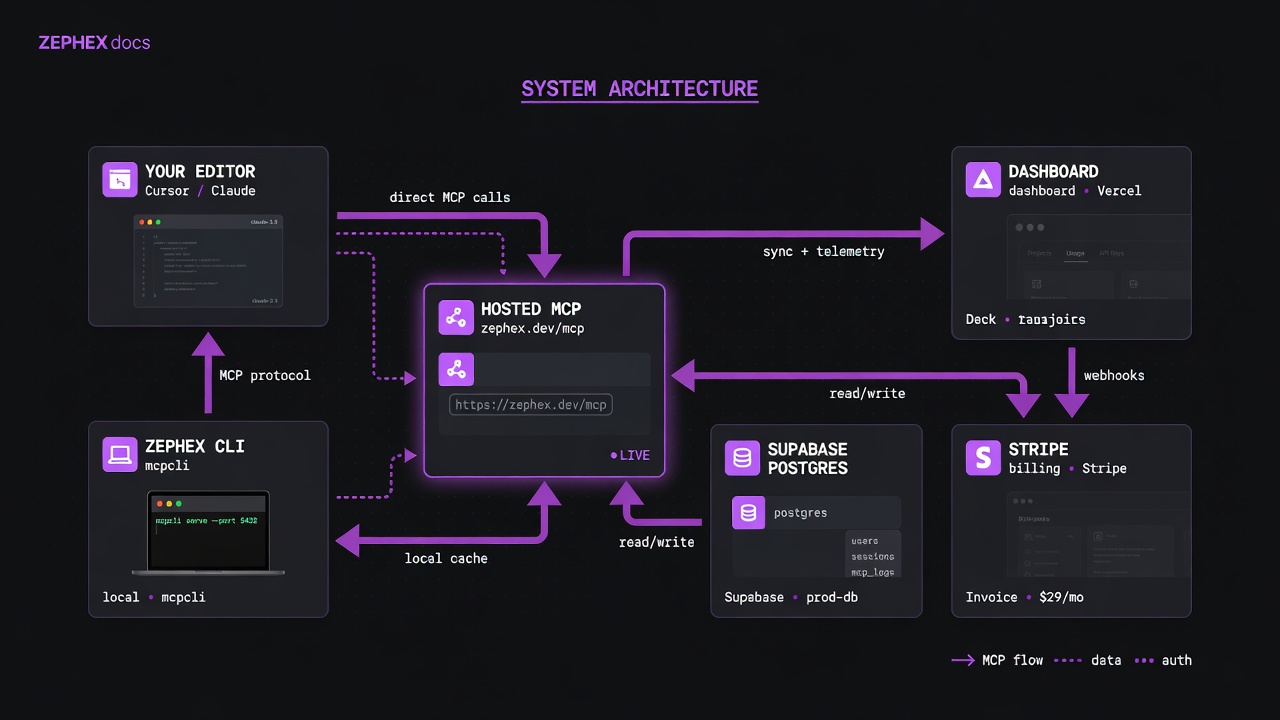
System map — client surfaces on the left, hosted control plane on the right.
Mode 1 — Editor MCP
Lean JSON for the agent. Setup: mcpcli setup --cursor
Mode 2 — Terminal CLI
Answer cards — plain English, Dig deeper. Setup: mcpcli init
Your editor sends a single JSON-RPC call. The proxy authenticates, routes to the right tool, returns one response.
No AI agent in the loop. Your shell runs npx zephex; the CLI uploads a search index from disk (inline_files) and calls the same hosted endpoint as your editor.
The five components
┌──────────────────┐    ┌──────────────────┐    ┌──────────────────┐
│   Your editor    │    │   zephex CLI     │    │  Hosted MCP      │
│  (Cursor, VS     │◄──►│  (your machine)  │◄──►│  proxy           │
│   Code, etc.)    │    │  npm: zephex     │    │  zephex.dev/mcp  │
└──────────────────┘    └────────┬─────────┘    └────────┬─────────┘
                                 │                       │
                                 │                       │
                                 ▼                       ▼
                        ┌──────────────────────────────────┐
                        │   Dashboard backend              │
                        │   zephex.dev (Next.js + Vercel)  │
                        │   /api/cli/* endpoints           │
                        └────────┬─────────────────────────┘
                                 │
                       ┌─────────┴──────────┐
                       │                    │
                       ▼                    ▼
              ┌─────────────────┐  ┌──────────────────┐
              │  Supabase Auth  │  │  Supabase         │
              │  (dashboard +   │  │  Postgres         │
              │   CLI setup)    │  │  api_keys, users, │
              │                 │  │  usage_events,    │
              │                 │  │  cli_auth_sessions│
              └─────────────────┘  └──────────────────┘
                        │
                        ▼
              ┌─────────────────┐
              │  Auth0          │
              │  MCP connector  │
              │  OAuth (PKCE)   │
              └─────────────────┘
Component-by-component
1. Your editor (Cursor, VS Code, Claude Desktop, ...)
Reads your editor's MCP config file (e.g. ~/.cursor/mcp.json). When the editor starts an MCP session, it spawns npx zephex as a child process and talks to it via stdio (JSON-RPC over stdin/stdout).
Some editors use direct HTTP instead (Cursor when configured with url, VS Code with type: "http") — in that case there's no local CLI process; the editor talks directly to zephex.dev/mcp.
2. The Zephex CLI (npm package zephex)
A thin Node.js binary distributed via npm. Three roles:
- Setup wizard —
npx zephex setupruns the OAuth flow and writes editor config files - Management —
list,status,doctor,tools,keys,usage, etc. - Stdio bridge — when invoked with no args by an editor, forwards JSON-RPC requests from stdin to
zephex.dev/mcpand streams responses back
3. Hosted MCP proxy (zephex.dev/mcp)
Vercel proxies zephex.dev/mcp to the Railway MCP server (zephex-production.up.railway.app). The backend validates the API key on every request, rate-limits per tier, executes the tool, logs usage to Supabase, and returns the result.
10 MCP tools live here — each has a terminal command. Pulse product lines (web, site, supply, shadow) are terminal-first scans on top of the same platform.
| MCP | Terminal |
|---|---|
get_project_context | get-context · overview |
find_code | find-code · find · rename |
read_code | summarize · outline · symbol |
explain_architecture | architecture · arch |
check_test | check-test · test (legacy: scope-task) |
check_package | check-package · safe · pkg |
project_memory | remember · recall · memory |
audit_headers | check url · site-audit |
keep_thinking | think · reason (one-shot) |
Zephex_dev_info | docs · ask |
Deep dive: How it works · Terminal Mode 2 · Tools overview
4. Dashboard backend (zephex.dev)
Next.js app on Vercel. Runs the marketing site, the dashboard UI, and the CLI auth endpoints:
POST /api/cli/session— CLI creates a one-time auth sessionPOST /api/cli/complete— browser callback marks session done + creates API keyGET /api/cli/poll— CLI polls for session completionPOST /api/cli/create-key— alternate key creation when CLI has an Auth0 JWT (legacy path; primary setup uses Supabase session +/api/cli/complete)POST /api/cli/usage— tool-call counts (today / this month + per-tool)POST /api/cli/revoke— disconnects revoke the key server-side
5. Supabase Auth + Auth0 + Supabase Postgres
Supabase Auth handles dashboard and CLI setup sign-in (email/password, GitHub, Google). Sessions use HttpOnly cookies on zephex.dev.
Auth0 is the authorization server for MCP connector clients (Claude.ai, ChatGPT) via OAuth 2.1 PKCE. Access tokens are scoped to https://zephex.dev/mcp.
Supabase Postgres is the canonical database. RLS-protected tables for users, API keys, usage events, sessions. Service-role access only from the dashboard backend.
End-to-end flow: a single tool call
Time  Component       What happens
────  ──────────────  ─────────────────────────────────────────────────
0ms   Editor          You type "find where validateToken is used"
10ms  Editor          Calls find_code via MCP
                       (over stdio if local, HTTP if direct)
15ms  CLI bridge      Forwards JSON-RPC to zephex.dev/mcp
                       with Authorization: Bearer <key>
50ms  Proxy           Validates key (lookup by 20-char prefix
                       in Supabase api_keys table)
55ms  Proxy           Checks rate limit (token bucket in Redis)
60ms  Proxy           Executes find_code tool
                       (BM25 search, AST extraction)
180ms Proxy           Returns ranked results
181ms Proxy           Logs usage_event row to Supabase
                       (api_key_id, tool_name, duration, success)
185ms CLI bridge      Streams response back to editor stdio
190ms Editor          Shows results in the chat
                       Total: ~190ms
Why this visual + table makes the architecture easier to understand: The ASCII flow above is complemented by our reusable decision graphs (see First Tool Decision Flow and Editor Integration Matrix). For agents and humans, these visuals clarify branching logic that prose alone can obscure.
Decision Table: When to Use Which Component
| Scenario | Recommended Starting Component | Why |
|---|---|---|
| New codebase / orientation | CLI + get_project_context | Instant stack snapshot without reading dozens of files |
| Task with clear description | check_test first | Minimal file set + risk assessment before any reads |
| High-risk / multi-step debugging | keep_thinking session | Persistent memory prevents lost conclusions and loops |
| Post-deploy security check | audit_headers on the URL | Real TLS/headers/cookies/redirects from production |
End-to-end flow: npx zephex setup
Step  Component       What happens
────  ──────────────  ─────────────────────────────────────────────────
1     CLI             User picks editor (e.g. Cursor)
2     CLI → Backend   POST /api/cli/session
                       Returns { session_id }
3     Backend → DB    Insert into cli_auth_sessions
                       (session_id, status='pending')
4     CLI             Opens browser to
                       zephex.dev/cli/auth?session=<id>
5     Browser         User signs in via Supabase Auth
                       (GitHub or Google OAuth)
6     Browser         Session cookie set on zephex.dev
7     Browser         POST /api/cli/complete
                       { session_id } (reads Supabase session)
8     Backend         Verifies logged-in user from session
9     Backend → DB    Upserts user (or fetches existing)
10    Backend → DB    Generates API key (mcp_prod_priv-XXX.YYY)
                       Hashes with HMAC-SHA256 + salt
                       Inserts into api_keys with editor name
                       e.g. user_defined_name = "cursor-a4f2"
11    Backend → DB    Updates cli_auth_sessions
                       (status='completed', api_key=<plain>)
12    CLI             Polls /api/cli/poll until status='completed'
13    CLI             Receives plain key
14    CLI             Writes editor config file
                       (e.g. ~/.cursor/mcp.json)
15    CLI             Optionally installs SKILL.md + rule.md
16    CLI             Tells user to restart editor
                       Total: ~30-60 seconds
Database tables (Supabase)
Table                       Purpose
──────────────────────────  ───────────────────────────────────────────
users                       User accounts (free, pro, max tiers)
api_keys                    Hashed API keys + per-key config
                            (user_defined_name = e.g. "cursor-a4f2")
cli_auth_sessions           One-time session tokens for CLI ↔ browser
                            handoff
cli_key_creates             Audit log of successful key creations
cli_setup_errors            Failed setup attempts (for debugging)
usage_events                Every tool call (api_key_id, tool_name,
                            duration_ms, success, ts) — partitioned
                            by month (usage_events_202605, ...)
tool_usage_rollups_daily    Per-day aggregates for the dashboard
tool_usage_rollups_monthly  Per-month aggregates for usage limits
mcp_tool_definitions        The 10 tools (name, description, schema)
user_tool_overrides         Per-user tool filtering (subset of 10)
subscriptions               Stripe subscription state
stripe_meter_events         Metered billing events (per-tool calls)
authentication_logs         Login/auth audit trail
security_events             Security audit log (key revocations,
                            anomalies, etc.)
Security boundaries
Boundary              Trust level     What's enforced
────────────────────  ──────────────  ─────────────────────────────────
Your editor ↔ CLI     Trusted         stdio pipe; no auth needed
CLI ↔ Proxy           Authenticated   Bearer token (the API key) on
                                       every HTTP request
Browser ↔ Dashboard   Session         Supabase Auth HttpOnly cookies
MCP Connector ↔ OAuth Auth0 JWT       PKCE; JWKS verified for audience
                                       https://zephex.dev/mcp
Backend ↔ Supabase    Service role    Bypasses RLS for admin ops; user
                                       queries use anon key + RLS
Proxy ↔ Tools         Sandboxed       Each tool runs in isolation;
                                       can't see other users' data
API key format
Keys look like mcp_prod_priv-1234.abc123.... The first 20 chars are the lookup prefix (indexed in Supabase). The rest is hashed with HMAC-SHA256 plus a per-key salt. We never store the plain key.
Key lookup performance
On every MCP request the proxy:
- Reads the
Authorization: Bearer mcp_prod_priv-1234...header - Extracts the first 20 chars as the prefix
- Queries
api_keys WHERE key_prefix = $1 AND revoked_at IS NULL(indexed lookup ~2ms) - HMAC-SHA256s the full plain key with the per-key salt
- Compares against
key_hashcolumn (constant-time compare) - Caches the validation in Redis for 60 seconds
What happens if a piece is down?
Component down        Effect
────────────────────  ────────────────────────────────────────────────
Supabase Auth         Dashboard/CLI setup sign-in fails (existing keys work)
Auth0                 MCP connector OAuth fails (API keys still work)
Supabase Postgres     All MCP calls fail with 503 (no key validation)
Vercel dashboard      Setup wizard breaks (CLI stdio bridge still works
                       if you already have a key)
zephex.dev/mcp        All tool calls fail (editor shows error per tool)
Your local CLI        For HTTP-mode editors: nothing — they talk
                       directly to the proxy. For stdio editors: tools
                       unavailable.
npm registry          New users can't run npx zephex setup
Where to next
- Setup Walkthrough — visual guide to each setup step
- CLI Commands — every command, every flag
- API Key Naming — how keys are named per editor
- Data Handling — what we store and for how long