Legal
Data Handling & Processing
Last updated: July 2026. Zephex is a stateless MCP proxy for tool execution. Account metadata (hashed keys, usage) is stored; tool payloads are request-scoped. This page is the product data policy — Mode 1, Mode 2, and local-first uploads.
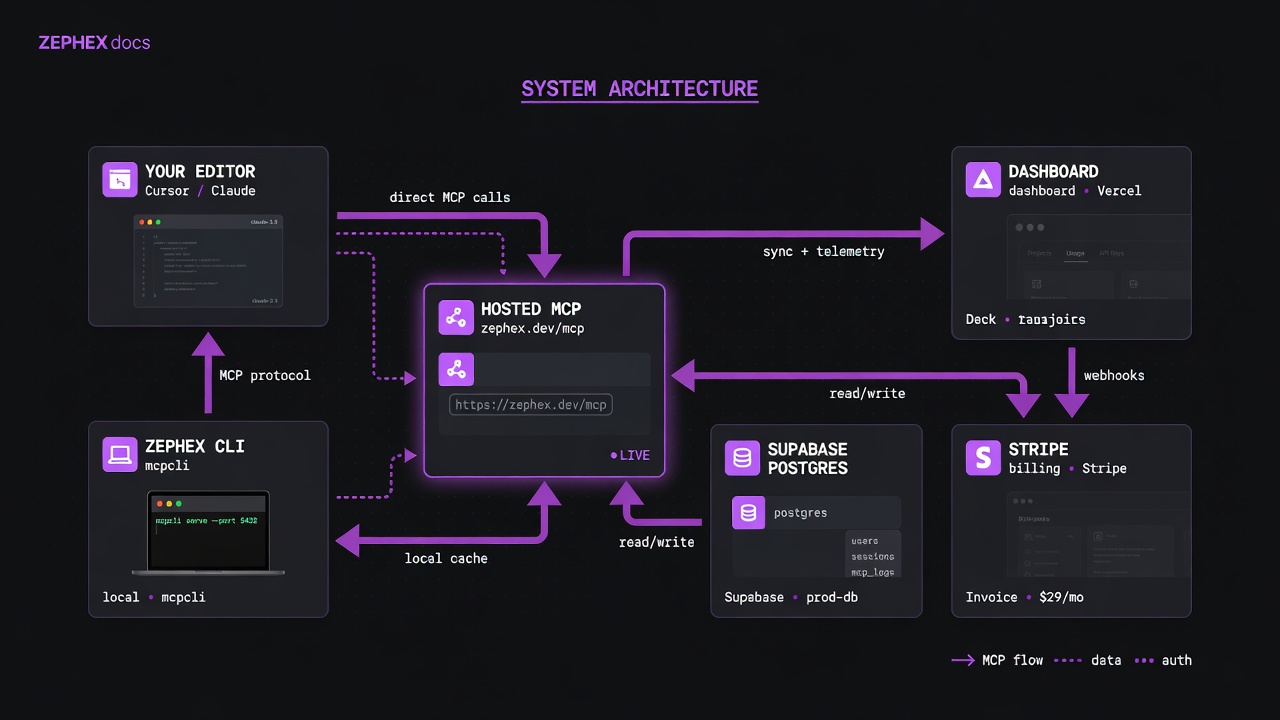
Clients → TLS → auth → tools → discard. Control plane stores hashes and usage, not full repos.
Keys are hashed. Usage metadata is logged. Tool payloads are request-scoped. Terminal credentials stay on your machine.
Editor agents receive lean JSON. Terminal humans get answer cards. Quota is shared.
| Layer | Stored / kept | Not treated as long-term store |
|---|---|---|
| API keys | SHA-256 (or HMAC) hash only — never plain secret in DB/logs | Full secret after issuance |
| Tool payloads | Usage metadata (tool name, status, duration, key id) | Full source bodies as long-term training data |
| Terminal credentials | ~/.zephex/credentials.json on your machine (mode 600) | On Zephex disk as a second copy of the secret beyond hashed key records |
| inline_files / local index | In flight for the request (hosted tool execution memory) | As a permanent private repo mirror (unless you use public GitHub remote path) |
| project_memory | Facts you explicitly remember (hosted or local SQLite depending on transport) | Automatic full chat dumps |
Default (terminal + many tools): upload manifests + bounded source as inline_files from your current directory.Private repos work without making GitHub public.Force remote only with --path github:owner/repo or --no-local.Empty ~ or /tmp fails fast — do not burn quota.Monorepos: cd into the package or pass --cwd.- HTTPS only to zephex.dev — TLS for all client traffic.
- API keys hashed at rest; never log full secrets in production paths.
- Rate limits per key via Upstash-style sliding windows; 429 + Retry-After.
- Dashboard uses secure cookie flags on session auth; MCP uses Bearer keys.
- Tool allowlisting on the server — arbitrary tool names from clients are rejected.
- Local CLI credentials: ~/.zephex/credentials.json with restrictive file mode.
Persistent account data is stored in Supabase Postgres (API key hashes, usage logs, billing metadata). Dashboard login and OAuth flows use Supabase Auth. MCP requests authenticate with Bearer API keys only — never your dashboard password. Service health: zephex.dev/status.
| Provider | Role |
|---|---|
| Supabase | Postgres database and dashboard authentication (accounts, API key hashes, usage logs, sessions). |
| Auth0 | OAuth authorization server for MCP connector clients (Claude.ai, ChatGPT, PKCE flows). |
| Railway | MCP Server — hosts tool execution (find_code, read_code, check_test, etc.). |
| Vercel | Dashboard, public MCP endpoint proxy (zephex.dev/mcp), and edge routing. |
| Upstash Redis | Rate limiting, session cache, and health-check coordination. |
| Stripe | Payments, subscriptions, and billing meters. |
| Resend | Transactional email (verification, security alerts, billing notices). |
| Sentry | Error monitoring with PII redaction. |
| PostHog | Product analytics (optional; EU users can decline via cookie banner). |
Client (your editor / CLI) │ ├─ TLS 1.3 encrypted connection │ ▼MCP Endpoint (zephex.dev/mcp — Vercel) │ ├─ API key validated (HMAC-SHA256 hash vs Supabase) ├─ Rate limit checked (Upstash Redis) ├─ Usage counter incremented (Supabase) │ ▼MCP Server (Railway) │ ├─ Tool arguments parsed ├─ Tool executed in isolated context ├─ Result assembled in memory │ ▼Response returned to client │ ├─ Tool input/output discarded from memory ├─ Only metadata logged (tool name, timestamp, status) └─ No code, no prompts, no outputs persistedThe entire tool call — from receiving your arguments to returning the result — happens in a single request/response cycle. There is no queue, no background job, and no intermediate storage. Once the HTTP response is sent, all tool-related data is garbage-collected from process memory.
| Data | Stored? | Where | Duration |
|---|---|---|---|
| Your source code | No | — | — |
| Tool input arguments | No | — | — |
| Tool output / response body | No | — | — |
| Your AI prompt / chat context | No | — | — |
| File contents accessed by tools | No | — | — |
| Tool name called | Yes | Supabase (encrypted at rest) | 90 days |
| Timestamp of call | Yes | Supabase | 90 days |
| Response status (success/error) | Yes | Supabase | 90 days |
| Latency (ms) | Yes | Supabase | 90 days |
| API key hash | Yes | Supabase | Until revoked |
| Hashed IP address | Yes | Supabase | 90 days |
In Transit
- All connections use TLS 1.3 (minimum TLS 1.2 for legacy clients).
- HSTS enforced with 1-year max-age and includeSubDomains.
- Certificate transparency logs monitored for unauthorized issuance.
- HTTP connections are rejected (not redirected) at the MCP endpoint to prevent accidental plaintext transmission.
At Rest
- Database storage uses AES-256 encryption on encrypted volumes.
- API key secrets are HMAC-SHA256 hashed with a per-key salt before storage — plaintext is never retained.
- MFA secrets are encrypted with AES-256-GCM using a per-user derived key.
- Backup snapshots inherit the same encryption as the primary database.
- Each tool call executes in an isolated async context within the proxy process.
- No shared mutable state between concurrent requests from different users.
- The proxy runs in isolated containers — no shared host kernel with other tenants.
- Container images are rebuilt from scratch on each deploy (no layer caching of user data).
- Memory is not swapped to disk.
What is logged:
- Tool name, timestamp, response status, latency — for usage tracking and billing.
- Authentication events (login, logout, failed attempts) — for security monitoring.
- Rate-limit events (blocked requests) — for abuse detection.
- Error stack traces (with PII redacted) — for debugging service issues.
What is never logged:
- Tool input arguments (file paths, search queries, URLs you analyze).
- Tool output content (code, analysis results, architecture diagrams).
- API key plaintext values.
- Request or response bodies.
- All tool execution happens in isolated, stateless containers.
- No shared host kernel between tenants.
- Memory is not swapped to disk.
- Container images are rebuilt from scratch on each deploy.
- All data processing occurs in the United States.
When you delete your account (Dashboard → Settings → Delete Account):
- All API keys are immediately revoked and hashes deleted.
- Profile data, usage events, and notification preferences are removed within 30 days.
- Stripe subscription is canceled immediately.
- Billing records are anonymized (retained for tax compliance, but no longer linked to your identity).
- Audit logs referencing your account are purged within 30 days.
- Email queue entries are deleted immediately.
If you roll Zephex out to a team, the account owner remains responsible for every API key created under that account. Each developer should use named keys per environment; shared keys in chat or public repos violate our acceptable-use rules.
Internal rollout policy, key governance, pilot checklist, and incident response: Team MCP rollout.
The 10 tools — data touch per call
| MCP tool | Name | What it processes |
|---|---|---|
| get_project_context | Project Context | First on a new repo before guessing install/test commands. Follow related_topics for deeper slices. |
| read_code | Code Reader | Known symbol or files[] from find_code. Outline before 300+ line files. Scan/smell on 3–8 focus files. |
| find_code | Code Search | Unknown location; pasted line; rename before editing; multi-keyword topic hunt. |
| explain_architecture | Architecture Analyzer | Before cross-cutting edits — how does this feature/subsystem span modules? |
| Zephex_dev_info | Zephex Dev Info | Generic playbook after repo tools if local context is insufficient. |
| audit_headers | Site Audit | User pastes live URL — post-deploy, security, framework, secrets, is it up. |
| check_test | Test Pulse | After code changes, before push, or when user asks if tests pass — not to find which files to edit. |
| check_package | Package Check | Before npm/pip/cargo install or version bump. User asks "is X safe?" or "how do I upgrade X?" |
| keep_thinking | Keep Thinking | High-blast-radius edit (auth, billing, schema); debugging after 2+ failed attempts; task spans 3+ files. |
| project_memory | Project Memory | User says remember/recall; before unfamiliar subsystem; after non-obvious decision. |
Zephex does not use prompts, tool inputs, tool outputs, or repository content accessed through tools to train, fine-tune, or evaluate AI models. This applies to all plans without exception.
- GDPR — data minimization, right to erasure, right to portability, 30-day response SLA.
- CCPA — no sale of personal information, deletion on request.
- SOC 2 — Supabase, Vercel, and Stripe maintain SOC 2 programs. Zephex is not independently SOC 2 certified.
- No model training — user data is never used to train, fine-tune, or evaluate AI models.
- Data residency — all primary data processing occurs in the United States.
Data handling questions: support@zephex.dev